Comparison
ETW Journal vs TradingView for Backtesting (2026)
We compare TradingView's Bar Replay — the replay tool most retail traders try first — with ETW Journal's backtesting sessions, to help you decide where to practise a strategy and, just as important, where your results should live afterwards.

Short on time? Here's the verdict.
TradingView is the best charting platform most traders will ever use, and Bar Replay is a great way to step back in time. But replay on TradingView is a chart feature, not a backtesting workspace: intraday replay needs a paid plan, depth on Essential and Plus is capped, and the trades you take don't become a tagged dataset you can analyse by setup or session. ETW Journal treats every backtest as its own session — with a dashboard, day view, reports and notebook — and sits next to your live MT5 and cTrader journal, so you can compare what you practise with what you actually do.
 Choose ETW Journal if:
- You want backtest results analysed like a real journal — by setup, session and R
- You want backtesting, a live journal and replay of your real trades in one $7–$15 tool
- You want ETW AI to read the chart, or place trades on your simulated account
Choose TradingView if:
- You need the widest market coverage and the best charting tools available
- You want automated strategy tests written in Pine Script
- You already pay for Premium and want deep intraday or seconds replay
Feature comparison
Side-by-Side Feature Comparison
Quick comparison — ETW Journal vs TradingView
| Feature | ETW Journal | TradingView |
|---|---|---|
| Starting price | $7/mo Essential · $15/mo Pro | Free Basic · Essential $14.95 · Plus $34.95 · Premium $69.95 /mo |
| Bar-by-bar replay | Any timeframe from 1m to 1D (Essential) | Daily and above on Basic; intraday from Essential |
| 1-minute replay depth | Included from the $7 plan | 6 months (Essential) · 1 year (Plus) · full history (Premium+) |
| Trading inside replay | Orders sized by balance %, stops, targets, live P&L | Paper trading during replay |
| Results per backtest | Each session has its own dashboard, day view, reports & notebook | Trades sit in paper-trading history |
| Tag setups & sessions | Win rate by model, session and rule | Not available for replay trades |
| AI on the chart | ETW AI reads structure & liquidity, or places the trade (Pro) | No journal-aware AI coach |
| Automated strategy testing | Manual, discretionary practice | Strategy Tester with Pine Script |
| Live trade journal | Auto-sync MT5, MT4, cTrader, TradeLocker, DXtrade | No trading journal |
| Replay your real MT5 trades | Trade, day or what-if (Pro) | Not from MT5 or cTrader accounts |
| Prop firm tracking | Prop Firm Sync on live accounts | Not available |
| Charts & indicators | Mark-up tools for breakers & FVGs, core indicators | Industry-leading charts, huge community script library |
| Best for | Practising and reviewing in one place | Charting, alerts & coding strategies |
IncludedPartial / with workaroundsNot available
Backtesting
Bar Replay is a feature. Backtesting is a workflow.
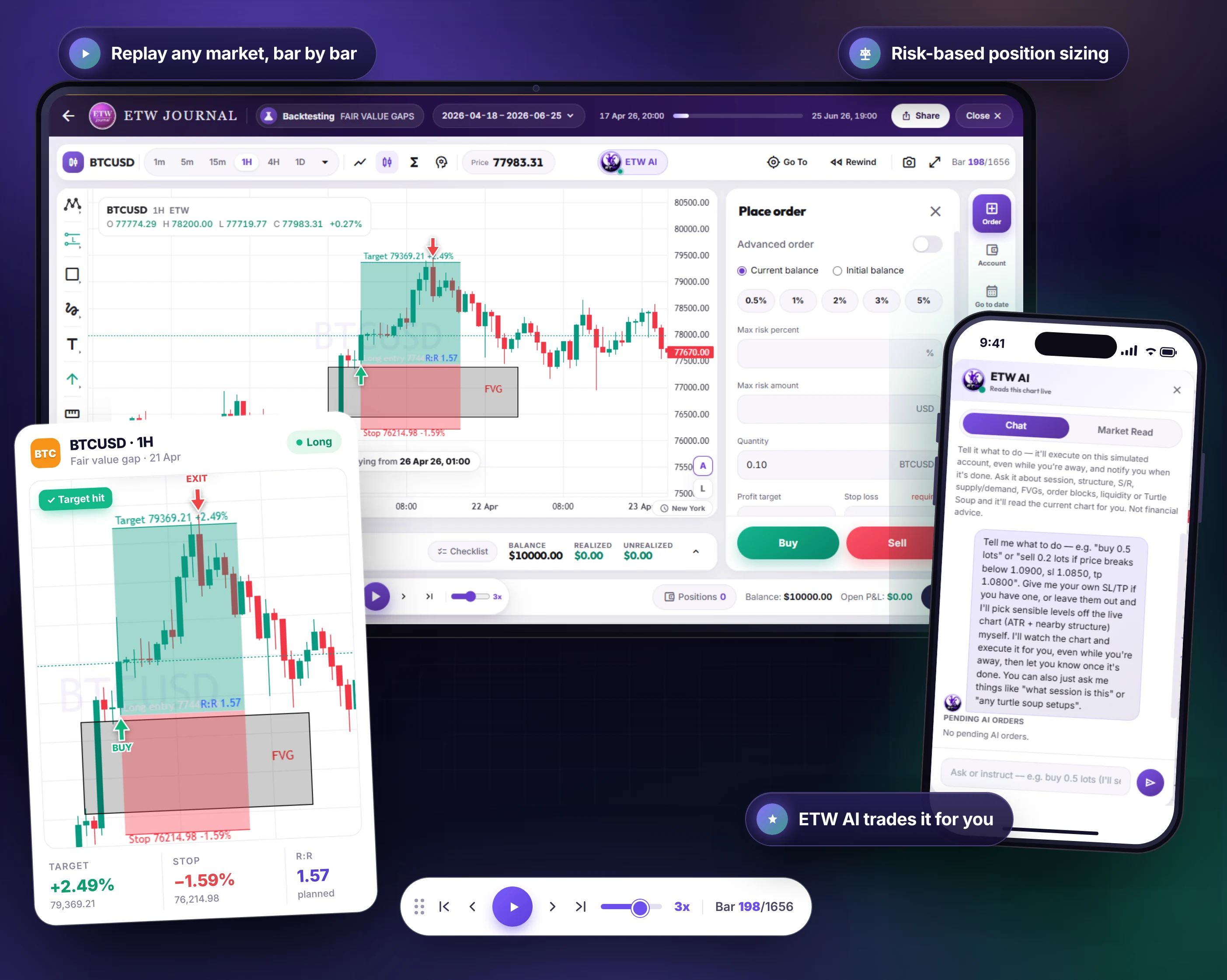
On TradingView you open a chart, press Replay, pick a start point and step forward. It's fast and familiar — but each replay is a moment on a chart, not a session you can come back to, compare and learn from.
In ETW Journal, a backtest is a session. Replay any market bar by bar from 1m to 1D, place orders sized by percentage of balance with stops and targets, mark up breakers and FVGs, and keep notes as you go. Each session keeps its own dashboard, day view, reports and notebook, so a strategy test has a beginning, an end and a verdict.
- Replay at the speed you choose
- Trade it like live with risk-based sizing
- Sessions you can pause, resume and compare
Results
Where do your replay trades actually go?
Trades taken in TradingView's replay land in paper-trading history: a list of orders and fills. There's no field for the setup you were testing, the session, or whether you followed your rules — so to learn anything you end up exporting to a spreadsheet.
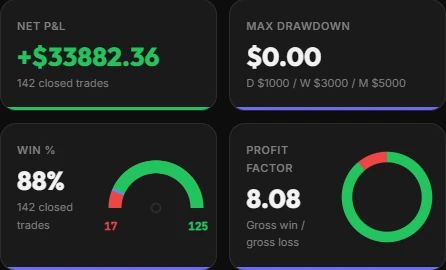
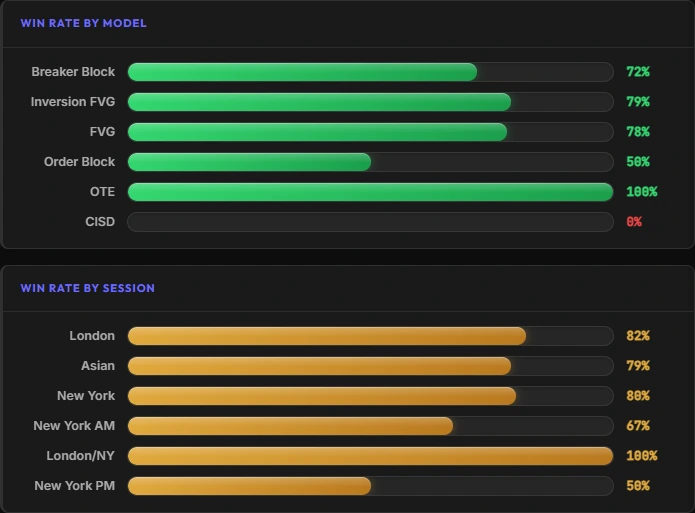
ETW Journal analyses backtest trades the same way it analyses live ones: net P&L, win rate, profit factor and R:R, then win rate by model and by session. You see that your FVG entries hit 78% while CISD never paid — before you risk a cent.
Data depth
How much history can you replay?
TradingView's free Basic plan replays daily, weekly and monthly charts only. Intraday replay starts on Essential, where 1-minute data goes back about 6 months; Plus extends that to 1 year; Premium and above unlock the full history TradingView stores, plus seconds-based replay.
If you test intraday models, that pushes you toward Plus ($34.95/mo) or Premium ($69.95/mo). ETW Journal includes 1m-to-1D backtesting on its $7 Essential plan, alongside the journal for your live trades.
Source: TradingView help centre, “How much data is available for Bar Replay?” — limits scale with the timeframe (for example 5-minute data on Essential goes back 30 months).
TradingView Bar Replay — 1-minute history by plan
Per TradingView's help centre. Higher timeframes scale up from these.
Basic
Daily+ only
Essential
6 months
Plus
1 year
Premium
Full history
ETW Journal Essential ($7): 1m–1D backtesting included, no intraday upsell
ETW AI
An AI that reads your chart — and your journal
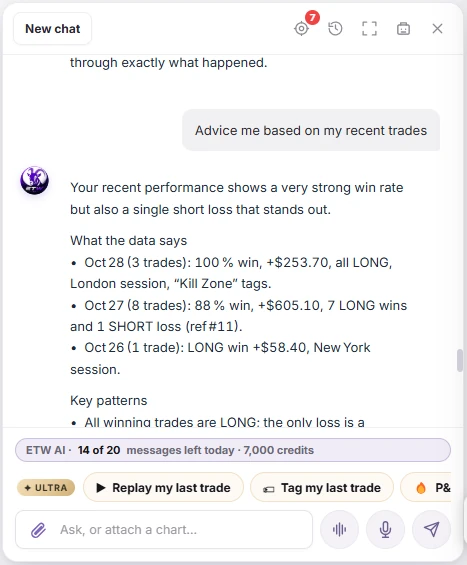
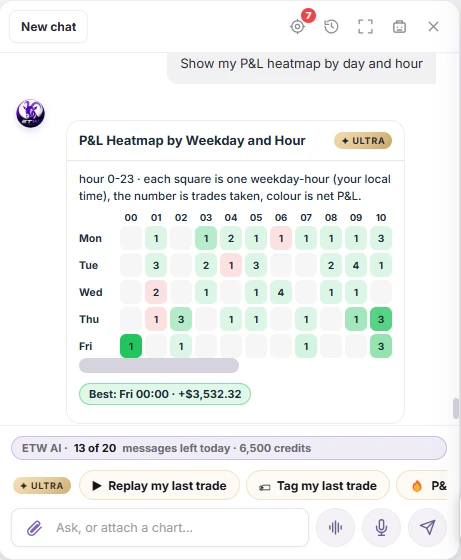
During an ETW backtest you can ask ETW AI about structure, liquidity or the session you're in, or tell it to place the trade on your simulated account. Because it also reads your journal, it can tell you whether the setup you're practising is one that actually pays you live.
Outside backtesting, ETW AI reviews your trading days, flags discipline gaps such as skipped checklists, and drafts session-prep briefings — answers drawn from your own trades and notes.
Practice → live
Practise it, then prove it live
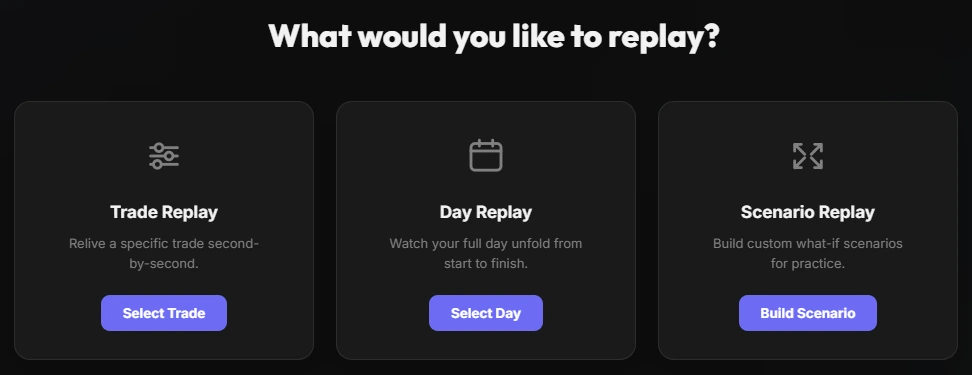
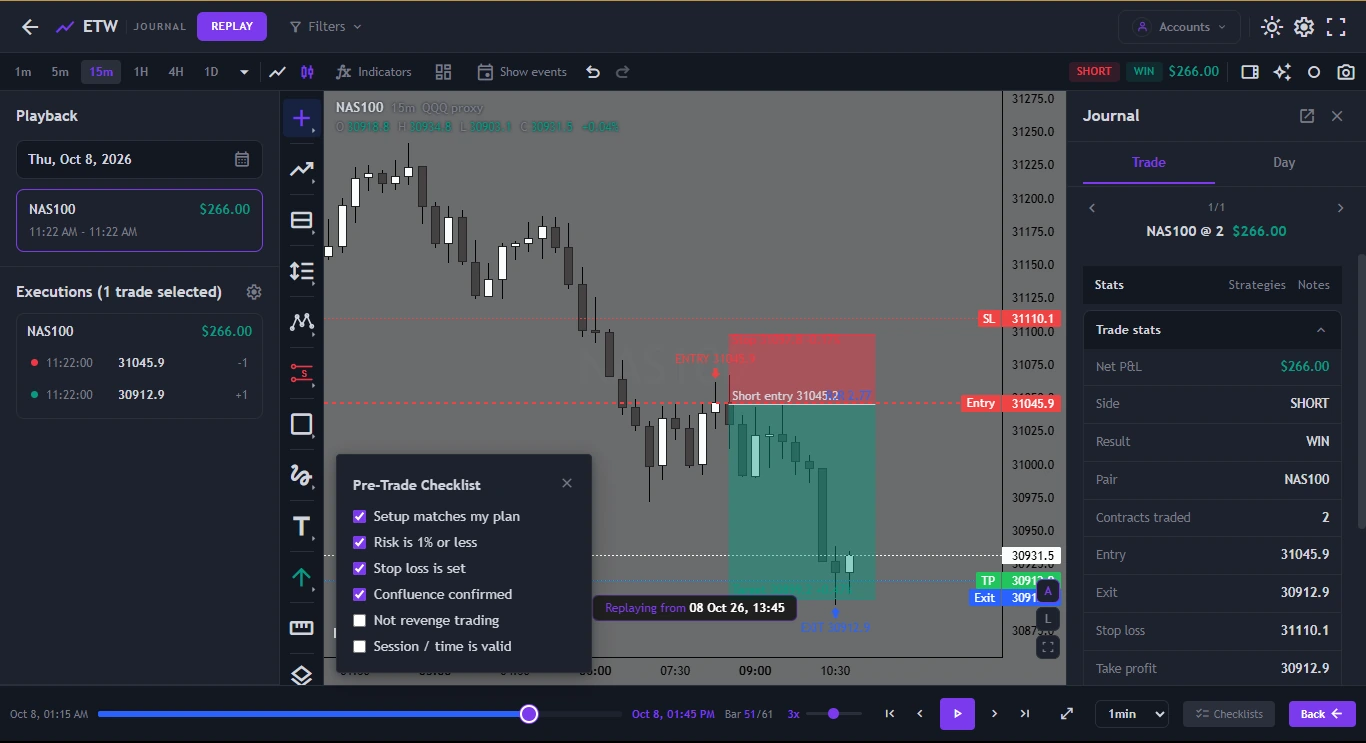
Backtesting only matters if it changes how you trade. Because ETW Journal also syncs your live MT5, MT4 and cTrader accounts, you can line up a backtested model against the same model traded live — and replay any real executed trade bar by bar to see where execution drifted from the plan.
Replay a single trade, a full day, or build a what-if scenario: what if you'd held to the target, or skipped the second entry?
Pricing
How the pricing compares
TradingView's Basic plan is free, but intraday replay — the part most backtesting needs — starts on paid plans. ETW Journal includes backtesting from $7, plus a full trading journal.
ETW Journal
Monthly billing · yearly saves 17%
Essential3 backtesting sessions, 1m–1D, journal, stats, reports
$7/mo
Pro10 sessions, ETW AI on the chart, trade replay, Mentor Mode
$15/mo
Quarterly and yearly billing available. Cancel any time.
TradingView
Monthly billing · annual saves roughly 13–17%
BasicReplay on daily+ only, ads
$0
EssentialIntraday replay, ~6 months of 1m
$14.95/mo
Plus~1 year of 1m data
$34.95/mo
PremiumFull history + seconds replay
$69.95/mo
TradingView US list prices, checked October 2026. TradingView also includes charting, alerts and screeners that ETW doesn't try to replace.
Fair is fair
Where TradingView genuinely wins
TradingView is a different kind of product, and in several areas it's simply the best there is.
World-class charting
Hundreds of built-in indicators, drawing tools and a massive library of community scripts. Most traders chart on TradingView whatever journal they use.
Automated strategy testing
Pine Script and the Strategy Tester let you code a strategy and backtest it across years in seconds. ETW Journal focuses on manual, discretionary practice.
Market coverage
Stocks, futures, forex, crypto and indices from exchanges around the world, with deep history on Premium and above.
Alerts & a free tier
Price and indicator alerts, screeners, a free Basic plan and a huge social community.
Final verdict
ETW Journal vs TradingView: which should you choose?
If you code strategies, need every market under the sun, or already pay for TradingView Premium, keep TradingView — it's the best charting platform available and its Strategy Tester has no equal for automated tests.
If you're a discretionary trader who wants backtests that turn into evidence — tagged by setup and session, reviewed in reports, and compared with your live MT5 or cTrader results — ETW Journal does that for $7–$15 a month. Plenty of traders use both: TradingView for charts and alerts, ETW Journal for practice, journaling and review.
FAQ
ETW Journal vs TradingView — Frequently Asked Questions
Is TradingView Bar Replay free?
Partly. On the free Basic plan you can replay daily, weekly and monthly charts. Intraday replay requires a paid plan, starting with Essential.
How far back can I replay on TradingView?
According to TradingView's help centre, 1-minute replay goes back about 6 months on Essential and 1 year on Plus, scaling up for higher timeframes. Premium, Expert and Ultimate can replay all the history TradingView stores, and Ultimate adds tick replay for the last 7 days.
Can ETW Journal run automated backtests like Pine Script?
No. ETW Journal's backtesting is manual: you replay the market bar by bar and take trades as you would live. If you need coded, automated strategy tests, TradingView's Strategy Tester is the better tool.
How many backtesting sessions do I get with ETW Journal?
Essential includes 3 backtesting sessions and Pro includes 10. Each session has its own dashboard, day view, reports and notebook.
Can I use TradingView and ETW Journal together?
Yes, and many traders do: TradingView for charting and alerts, ETW Journal for backtesting sessions, the live journal synced from MT5 or cTrader, trade replay and AI review.
Does ETW Journal connect to TradingView?
ETW Journal syncs from MT5, MT4, cTrader, TradeLocker and DXtrade. If your broker account runs on one of those platforms, your trades sync automatically no matter where you chart.
Backtest it. Journal it. Prove it.
Practise your model bar by bar, then see how it holds up on your live MT5 or cTrader account — in one place.
Get started →
Keep comparing