Comparison
ETW Journal vs Excel & Google Sheets as a Trading Journal (2026)
Almost every trader starts with a spreadsheet. We compare an Excel or Google Sheets journal with ETW Journal — which syncs your trades from MT5, MT4 and cTrader — to show where the spreadsheet stops scaling and what you get when the logging and the maths are done for you.

Short on time? Here's the verdict.
Spreadsheets are free (or already paid for), endlessly flexible and familiar. But a spreadsheet journal is only as good as the rows you paste and the formulas you maintain. ETW Journal replaces copy-pasting from MT5 with automatic sync, and replaces formulas and pivot tables with ready-made stats, reports, a P&L calendar and AI review. Stay with a spreadsheet if you enjoy building models and trade occasionally; move to ETW once maintaining the sheet starts eating the time you meant to spend reviewing.
 Choose ETW Journal if:
- You want MT5, MT4, cTrader, TradeLocker or DXtrade trades to appear without copy-paste
- You want reports by instrument, weekday, month, session and rules — no pivot tables
- You want screenshots, notes, checklists, replay and playbooks attached to each trade
Choose Excel & Sheets if:
- You want a free tool (Google Sheets) or already pay for Microsoft 365
- You love building custom models — Monte Carlo runs, sizing calculators, your own KPIs
- You take a few trades a month and want the file on your own computer
Feature comparison
Side-by-Side Feature Comparison
Quick comparison — ETW Journal vs Excel & Sheets
| Feature | ETW Journal | Excel & Sheets |
|---|---|---|
| Starting price | $7/mo Essential · $15/mo Pro | Google Sheets free · Microsoft 365 Personal $9.99/mo |
| Getting trades in | Auto-sync from MT5, MT4, cTrader, TradeLocker, DXtrade | Type or paste from an MT5 history export |
| Formulas to maintain | None — stats are built in | Every one of them |
| Error risk | Numbers come from your broker | One wrong cell ripples through every total |
| Screenshots & notes per trade | Built into every trade | Images in cells or links to cloud folders |
| P&L calendar | Daily heatmap + weekly totals | Conditional formatting you build |
| Reports | Instrument, weekday, month, session, rule compliance, Tag Lab | Pivot tables & charts you build |
| Prop firm rules | Drawdown & daily loss checked on synced trades | Formulas you write per firm |
| Trade replay | Single trade, day or what-if (Pro) | Not available |
| Backtesting | 3 sessions (Essential) · 10 (Pro) | Log manual backtests by hand |
| AI | ETW AI reads your journal (Pro) | Copilot / Gemini on paid plans — general purpose |
| Works offline | No — web app | Yes (Excel desktop) |
| Customisation | Tags, playbooks, checklists, Tag Lab | Unlimited |
IncludedPartial / with workaroundsNot available
Data entry
How long does a spreadsheet journal really take?
The usual routine: open MT5's history, export a report, copy the rows, fix the date format, convert the server time to yours, match the columns, paste, then drag the formulas down. Partial closes show up as separate deals you have to stitch back together.
Call it two minutes a trade. At 80 trades a month, that's close to three hours of data entry before you've reviewed a single decision — and it's the part most traders quietly stop doing.
ETW Journal pulls your full available history the first time you connect, then syncs new trades automatically. The numbers come from your broker, not your clipboard.
See supported platforms| Open (MT5) | Symbol | Side | Entry | Exit | P&L |
|---|---|---|---|---|---|
| 08/10 11:22 | NAS100 | Sell | 31045.9 | 30912.9 | 266.00 |
| 08/10 02:51 | NAS100 | Buy | 30871.2 | 30912.6 | 82.93 |
| 07/10 19:20 | XAUUSD | Sell | 2651.40 | 2648.10 | 65.44 |
| 07/10 11:18 | NAS100 | Buy | 30455.0 | ||
| 05/10 17:54 | NAS100 | Buy | 30120.4 | 30251.2 | #REF! |
Reports
Pivot tables vs. reports that build themselves
Spreadsheets can answer almost any question — if you build the pivot table, pick the right range and remember to extend it next month. Which instrument pays you? Which weekday costs you? Each answer is a small project.
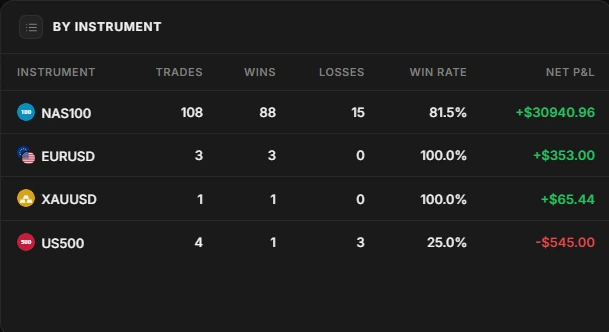
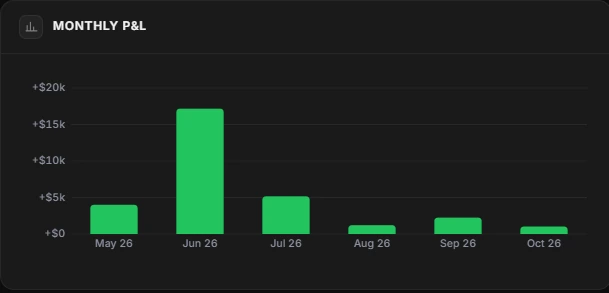
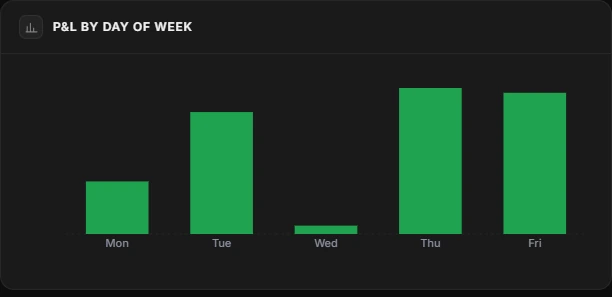
ETW Journal's reports are built straight from your trades: every instrument by trades, wins, losses, win rate and net P&L; monthly and day-of-week P&L; and a rule-compliance report that compares followed vs. broken trades. Tag Lab lets you put up to five tag combinations on one equity curve.
- Know which markets to drop
- See when you trade at your best — and when to sit out
- Prove your rules work with real numbers
Dashboard
A dashboard you never have to rebuild
Most spreadsheet journals end up with a dashboard tab: a few totals, a chart, some conditional formatting. It works until you insert a column, rename a sheet or add a second account.
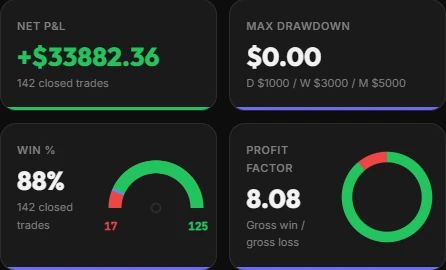
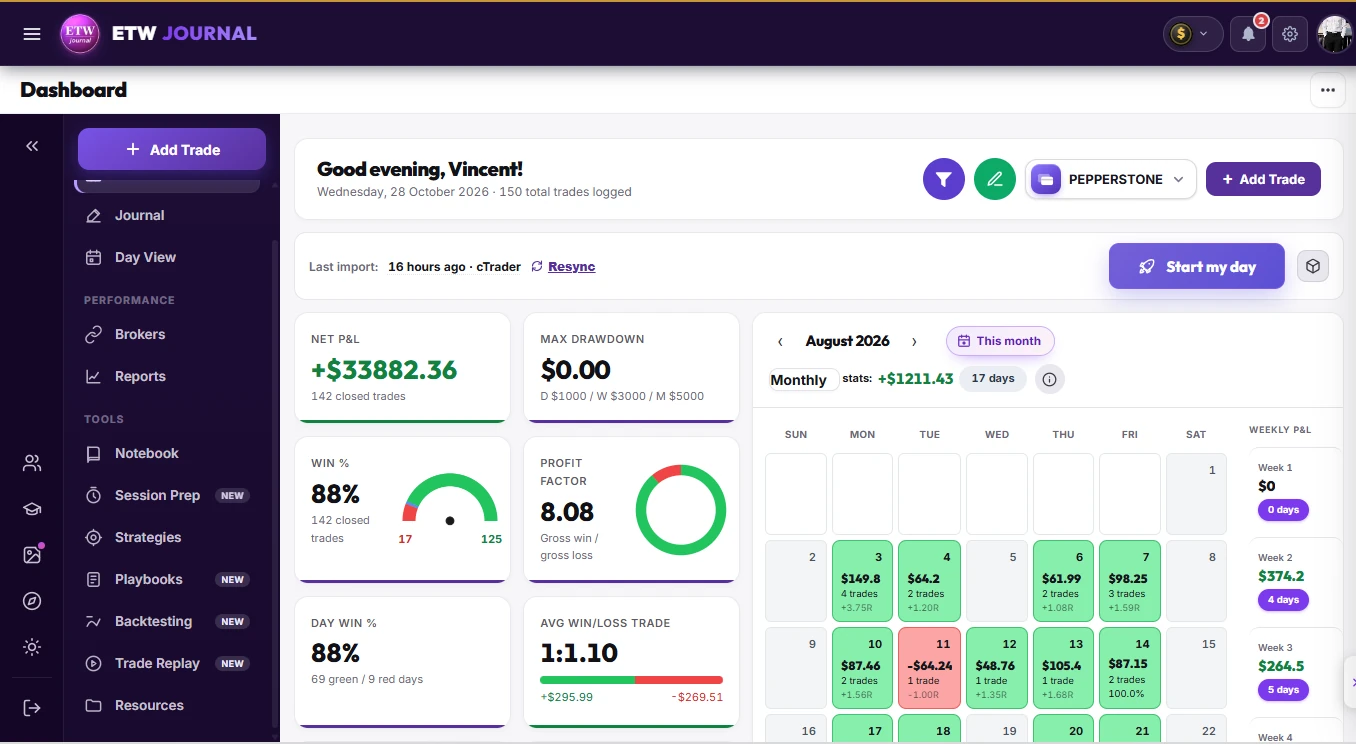
ETW Journal gives you net P&L, win rate, profit factor, average win/loss, R:R, drawdown and a colour-coded P&L calendar on day one — per account, or across live, funded and demo accounts side by side.
Prop firms
Tracking a prop challenge in a spreadsheet
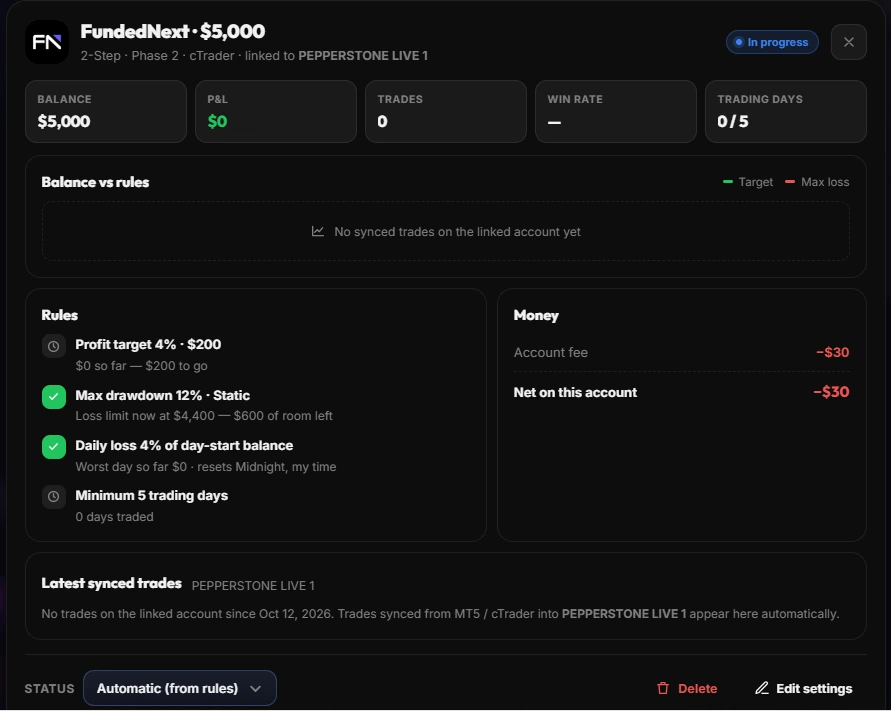
Prop rules are deceptively hard to model in a sheet. Daily loss limits often reset at a set time and are based on the day's starting balance or equity; max drawdown can be static or trailing; and fees, resets and payouts live somewhere else entirely.
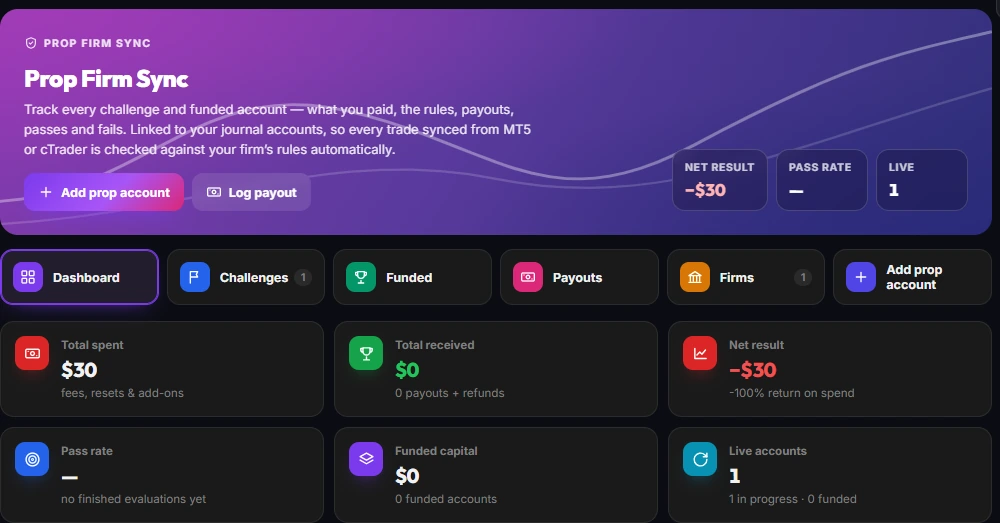
ETW's Prop Firm Sync links each challenge or funded account to a synced journal account, so every trade is checked against your firm's profit target, max drawdown and daily loss automatically. Fees, resets, payouts, passes and fails roll up into one net result across every firm.
Context
Rows can't replay a trade
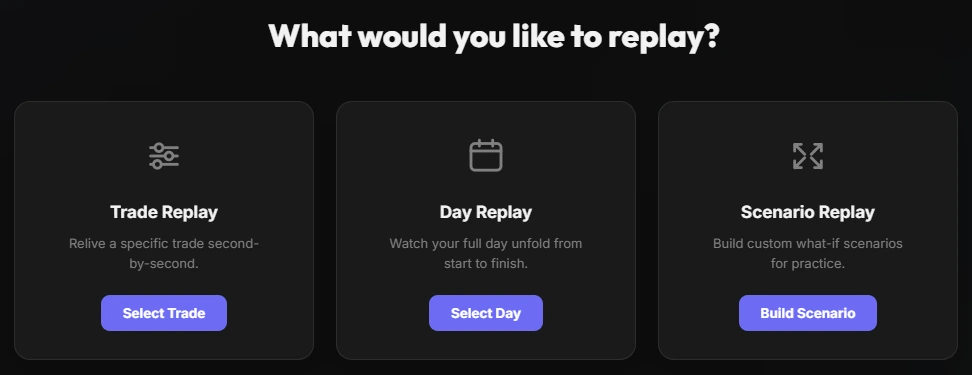
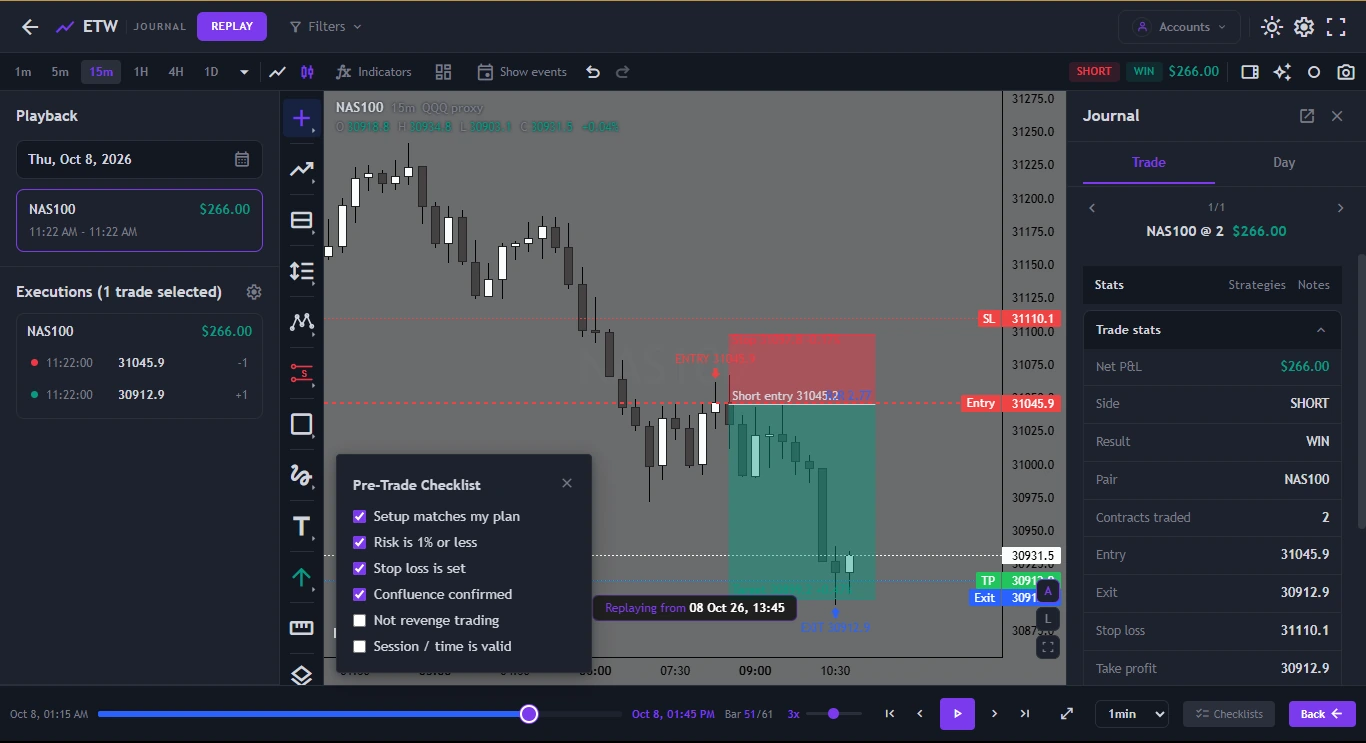
A spreadsheet row tells you what happened. It can't show you the hesitation before the entry or the level you ignored. ETW's trade replay puts your real entries, exits, stop and target back on the chart, bar by bar, with your pre-trade checklist and journal notes alongside.
Pair that with playbooks, ETW AI and a built-in economic calendar, and the review happens in one place instead of across a sheet, a charting site and a folder of screenshots.
Pricing
How the pricing compares
Google Sheets costs nothing and many traders already pay for Microsoft 365. ETW Journal costs a little more than a coffee a week — the question is what your time is worth.
ETW Journal
Monthly billing · yearly saves 17%
EssentialSync, journals, stats, reports, 3 backtesting sessions
$7/mo
Pro+ MT5/MT4 direct connect, ETW AI, trade replay, Mentor Mode, 10 backtests
$15/mo
Quarterly and yearly billing available. Cancel any time.
Excel & Sheets
Spreadsheet apps
Google SheetsFree with a Google account
$0
Excel for the webFree with a Microsoft account, fewer features
$0
Microsoft 365 PersonalDesktop Excel · or $99.99/yr
$9.99/mo
US list prices; Microsoft pricing varies by region. None include broker sync or trading reports.
Fair is fair
Where Excel & Sheets genuinely wins
Spreadsheets earned their place. Here's where they still beat any dedicated journal, ETW included.
Free and everywhere
Google Sheets costs nothing, runs on any device and almost everyone already knows how to use it.
Unlimited modelling
Monte Carlo simulations, position-size calculators, custom KPIs — if you can write the formula, you can have it.
Offline & yours
An Excel file sits on your own drive, works without internet and doesn't depend on any subscription.
Easy to share
Send a file or a link to anyone, with no account on a new platform required.
Final verdict
ETW Journal vs a spreadsheet: which should you choose?
If you trade a few times a month and enjoy building your own models, a spreadsheet is hard to beat — it's free, flexible and fully yours.
If you trade weekly or daily, the spreadsheet's real cost shows up as hours of copy-paste and formula repair, and reviews that slip because the data isn't ready. ETW Journal removes both: trades sync from MT5, MT4, cTrader, TradeLocker or DXtrade, and the stats, reports, calendar, replay and AI are already built. Keep the spreadsheet for custom modelling if you like — let ETW do the journaling.
FAQ
ETW Journal vs Excel & Sheets — Frequently Asked Questions
Is Excel or Google Sheets good enough for a trading journal?
It can be, especially at low trade frequency. The limits are manual data entry, formulas that break as the sheet grows, and reports you have to build yourself. Most traders hit those limits once they trade several times a week or run more than one account.
How do I export my MT5 history to Excel?
In MT5, open the History tab in the Toolbox, right-click and choose Report, then save it as an Excel-compatible file. You'll usually need to clean dates and columns before it fits your sheet. With ETW Journal you skip this step — history imports automatically when you connect.
Will ETW Journal import trades I already have?
When you connect an account for the first time, ETW Journal pulls the full available trade history of that account, not just new trades.
Can I still use my spreadsheet?
Yes. Many traders keep a sheet for custom models such as Monte Carlo runs or position sizing, and use ETW Journal for the day-to-day journal, reports and review.
How does ETW Journal's price compare to Microsoft 365?
ETW Journal Essential is $7 a month, below Microsoft 365 Personal's $9.99 US price. Google Sheets is free, but you build and maintain everything yourself.
Can I add trades manually in ETW Journal?
Yes. The Add Trade form lets you log any trade by hand — instrument, direction, entry, stop, target, size and P&L, plus your setup, emotions and a post-trade review — and R:R, pips, points and ticks are calculated for you.
Retire the copy-paste. Keep the insight.
Connect MT5, MT4 or cTrader and get the reports your spreadsheet was always trying to be.
Get started →
Keep comparing