Language
Get started

Let every trade teach you something.

ETW Journal syncs with MT5 and cTrader and keeps every trade in one honest record. Look back calmly, notice what's working, and let your process grow from there.

A quieter way to review your trading
Automated journaling Strategy tagging Built-in charts
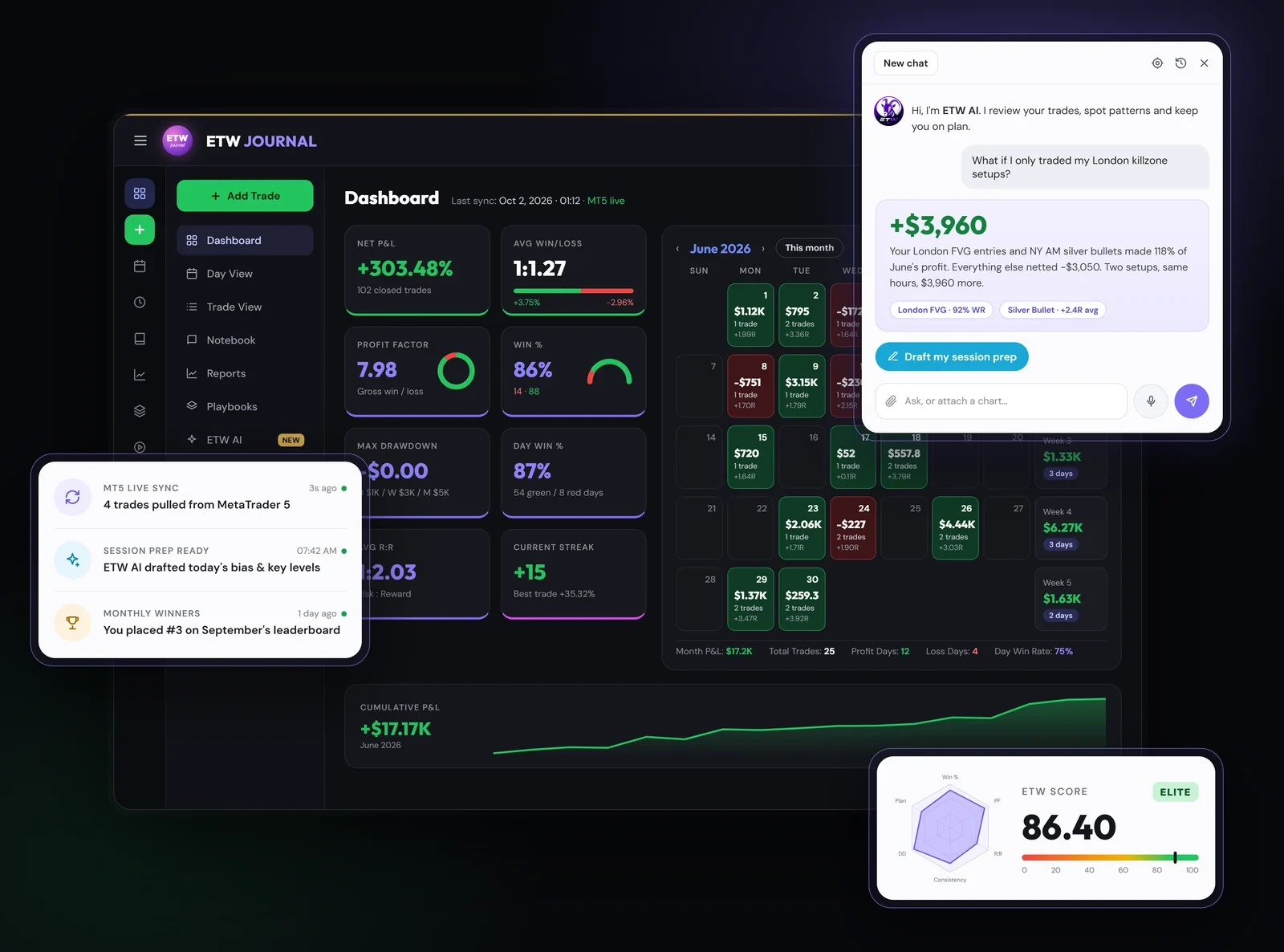
ETW Journal dashboard with P&L calendar, ETW AI chat, live MT5 sync and ETW Score
All your tools

Everything your trading needs, in one calm place.

Journal, replay, backtest and learn without juggling five apps. Pick a tool to jump straight to it.

Product tour

Take a 90-second walk through ETW Journal

A real session in the app: connect MT5, then your dashboard, strategies, playbooks, reports, notebook, trade replay, Share Studio and ETW AI, clicked through the way you'll actually use them.

MT5 connect Dashboard Light mode Trade tags Equity & discipline Strategies Playbooks Tag reports Compare tags Notebook Session prep Trade replay Share Studio Resources ETW AI
Automation

A journal that keeps itself

Connect once. From then on every trade is logged, sorted and measured while you get on with trading.

Automated journaling

Connect MT5, MT4, cTrader, TradeLocker or DXtrade, or add trades by hand. Your history imports first, then new trades sync automatically.

Supported platforms: MetaTrader 5, MetaTrader 4, cTrader, TradeLocker and DXtrade.

Every account, one journal

Track live, funded and demo accounts side by side, switch in one click, and see how each account performs on its own.
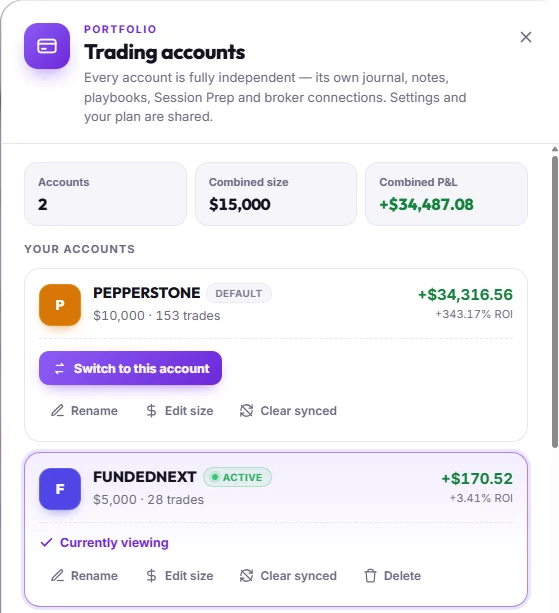
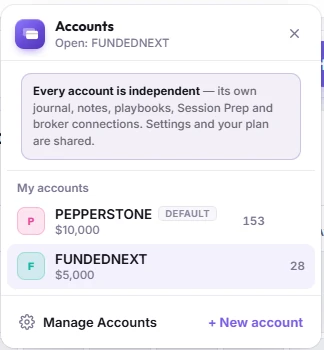
Trading accounts panel: 2 accounts, $15,000 combined size and +$34,487.08 combined P&L, with a $10,000 Pepperstone account and a $5,000 FundedNext account, each with its own trades, P&L and ROI Accounts switcher: every account is independent, with its own journal, notes, playbooks, Session Prep and broker connections; switch between Pepperstone and FundedNext in one click

Automated statistics

No spreadsheets or manual maths. Net P&L, profit factor, win rate, and win rate by model and session are worked out for you.
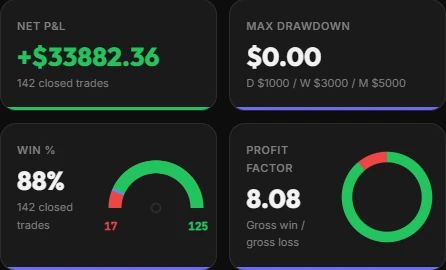
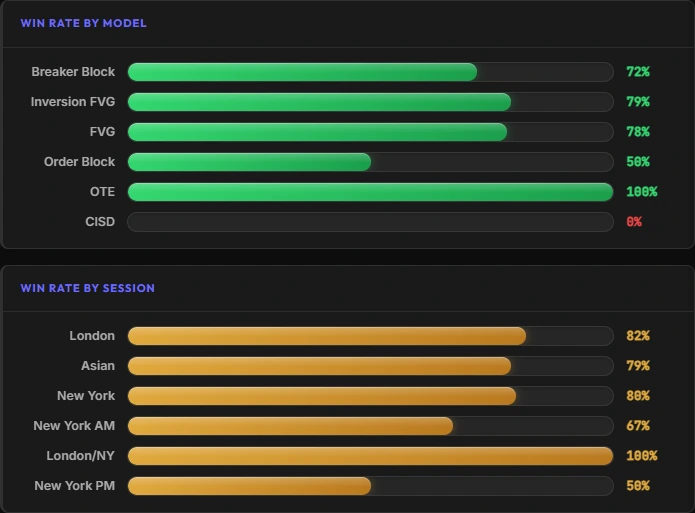
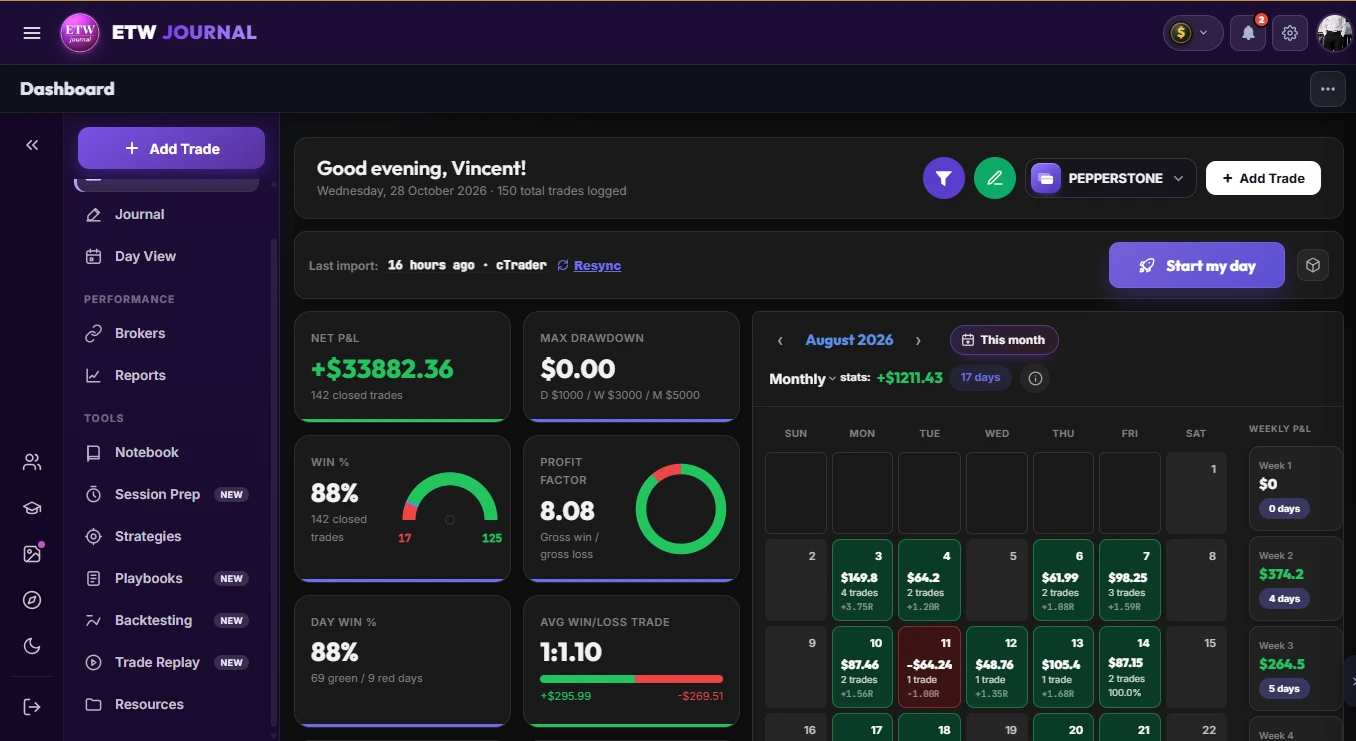
Stat tiles: net P&L +$33,882.36 over 142 closed trades, max drawdown $0.00, win rate 88%, profit factor 8.08 Win rate by model (Breaker Block 72%, Inversion FVG 79%, FVG 78%) and by session (London 82%, Asian 79%, New York 80%)
New Notion import

Years of trades in Notion? Bring them home in a few clicks.

Connect your Notion journal once and every trade moves across: the numbers, the notes you wrote at 2am, the tags you built your system on and every chart screenshot. Nothing gets left behind.
NAS100LongMar 14, 2023 · 2.4R+$412.50

Waited for London to sweep the Asia low, then took the 5m FVG. Didn't touch my stop. More of this.

LondonFVGPatient
✓Notes ✓Tags ✓Screenshots ✓Every column

Illustration: rows from a Notion trading journal database move one by one into ETW Journal. Each imported trade keeps its P&L, written notes, tags and chart screenshots.
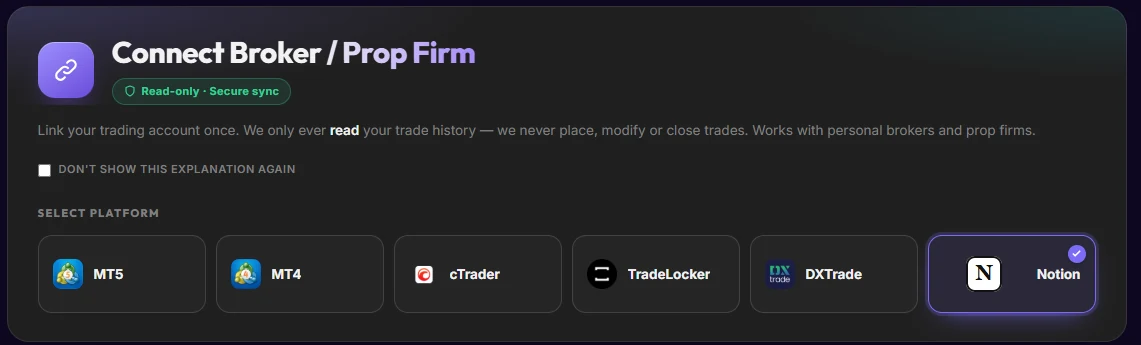
  1. ETW Journal Connect Broker / Prop Firm screen with Notion selected next to MT5, MT4, cTrader, TradeLocker and DXTrade
    Click one

    Pick Notion in Brokers

    Open Connect Broker, choose Notion and hit Connect Notion. Same place you link MT5 or cTrader.
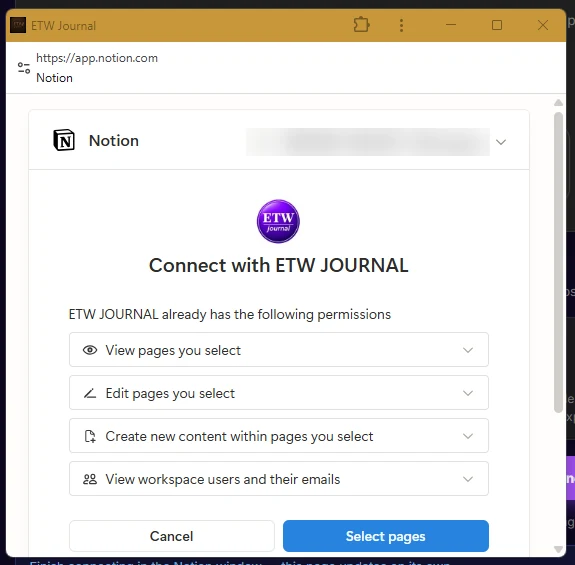
  2. Notion window asking to connect with ETW Journal, with a Select pages button
    Click two

    Share your journal page

    Notion opens and asks which pages to share. Pick your trading journal database. ETW only sees what you select.
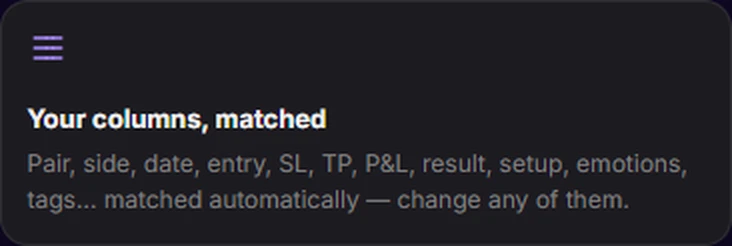
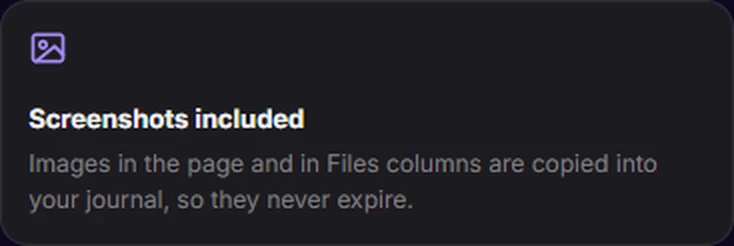
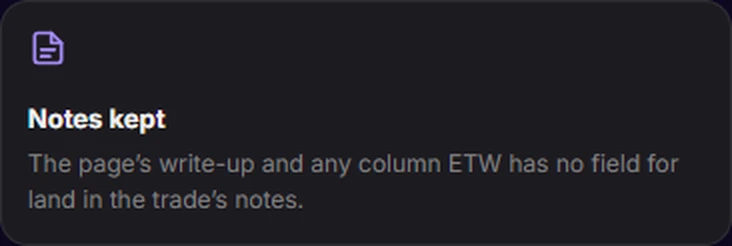
  3. Your columns, matched: pair, side, date, entry, SL, TP, P&L, result, setup, emotions and tags matched automaticallyScreenshots included: images in the page and in Files columns are copied into your journal so they never expireNotes kept: the page's write-up and any column ETW has no field for land in the trade's notes
    Click three

    Everything moves in

    Pair, side, entry, SL, TP, P&L, setup, emotions and tags are matched for you. Screenshots are copied in so they never expire.

Import my Notion journal You choose exactly which Notion pages ETW can see.
Dashboard

Your whole edge on one screen

Open ETW Journal and the answers are already there: how disciplined you've been, how the account is growing, and which hours and sessions pay you.

One score for your discipline

The ETW Score rolls win rate, profit factor, drawdown, recovery and consistency into one number out of 100, so you know at a glance if you're trading well.
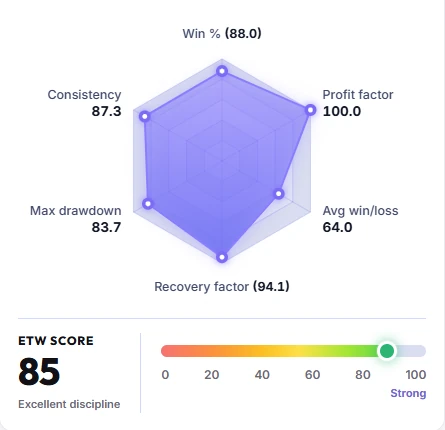
ETW Score radar: win rate 88, profit factor 100, average win/loss 64, recovery factor 94.1, max drawdown 83.7, consistency 87.3, overall score 85, excellent discipline

Every trade, the moment it closes

Recent trades land with their side, setup, R-multiple and P&L, next to open positions and a running equity line for your last ten.
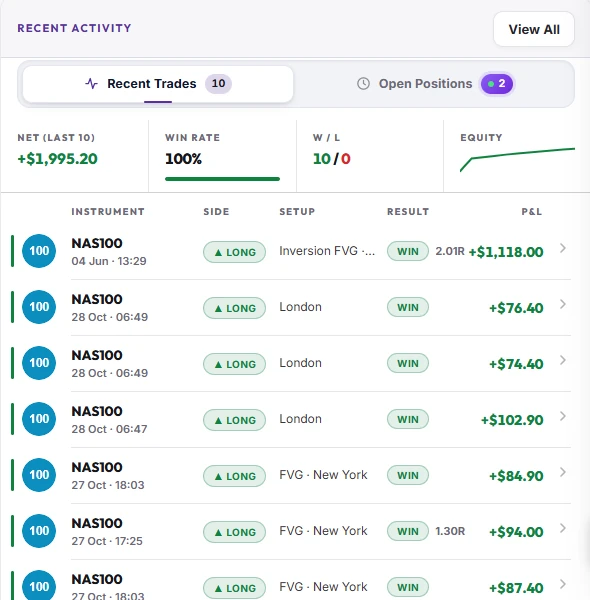
Recent activity: last 10 trades net +$1,995.20 at a 100% win rate, a list of winning NAS100 long trades tagged London, FVG New York and Inversion FVG

Watch the account grow

Your balance and equity curve from day one, with total return worked out for you.
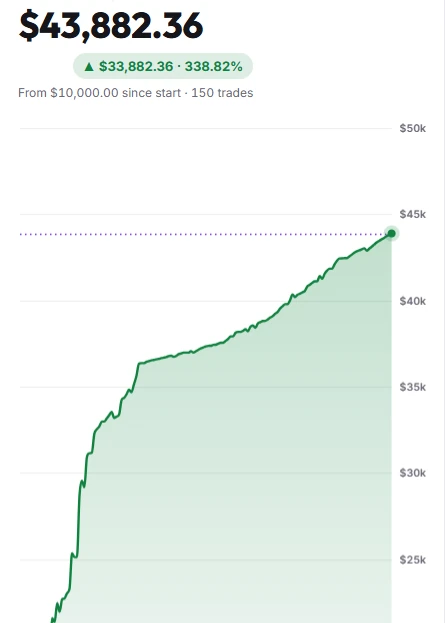
Account balance $43,882.36, up $33,882.36 or 338.82% from $10,000 over 150 trades, with a rising equity curve

Know your best hours and sessions

Every trade plotted by time of day, plus your win rate in London, New York and Asia, so you trade when you're sharpest.
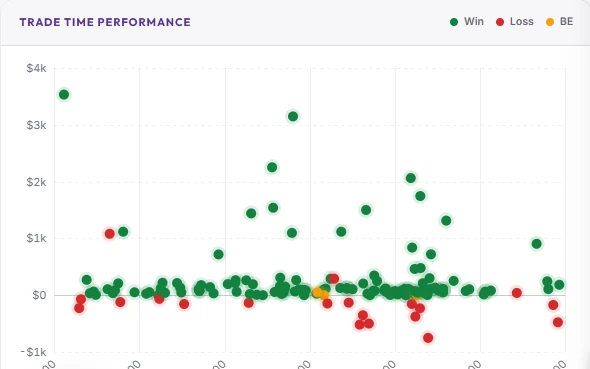
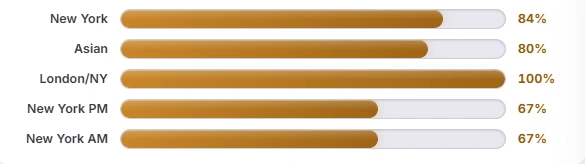
Trade time performance scatter plot of wins, losses and break-evens across the 24-hour dayWin rate by session: New York 84%, Asian 80%, London/NY 100%, New York PM 67%, New York AM 67%
Prop firm sync

Pass the challenge. Keep the funded account.

Track every challenge and funded account: what you paid, the rules, payouts, passes and fails. Each one links to your journal account, so every trade synced from MT5 or cTrader is checked against your firm's rules automatically.
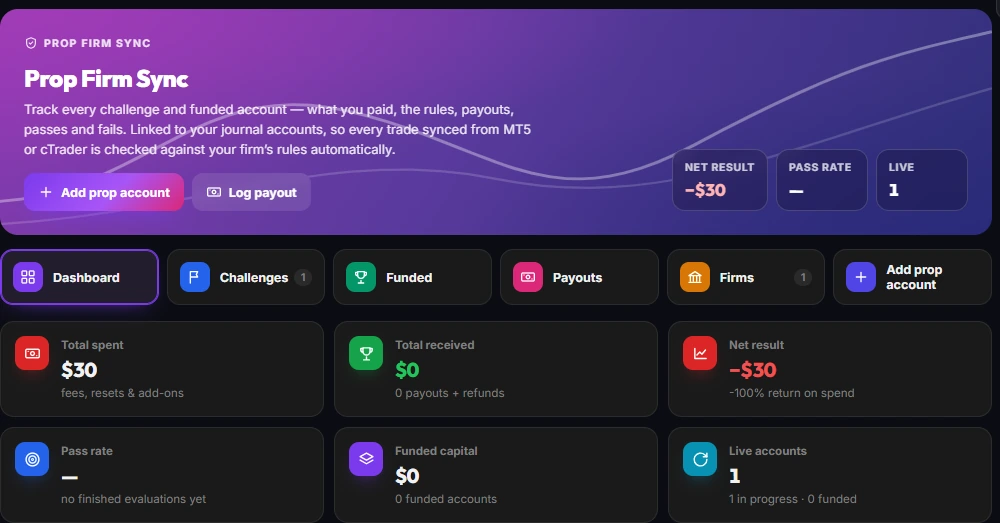
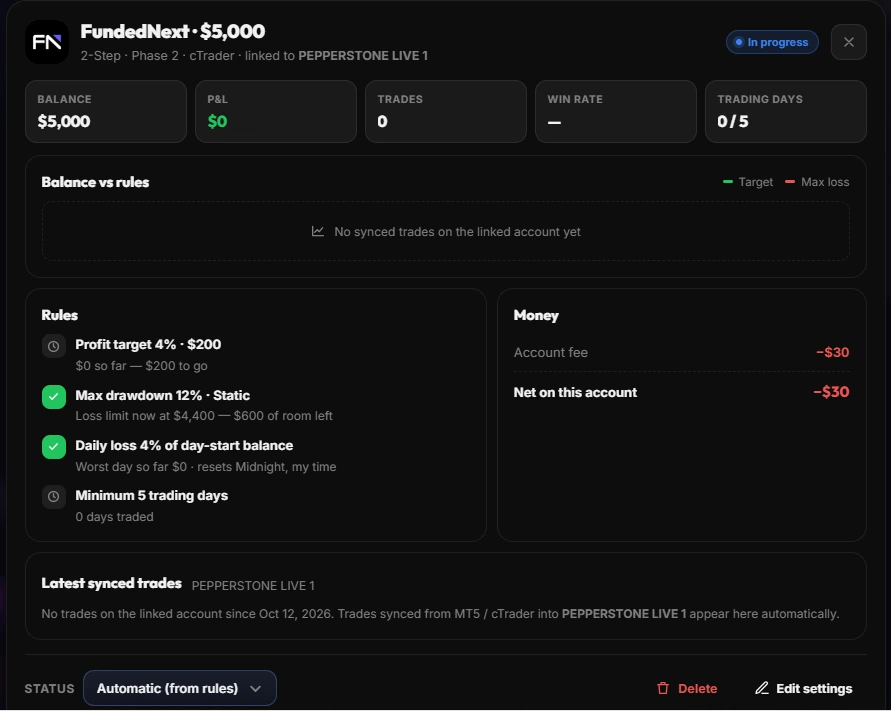
  • Profit target, max drawdown & daily loss tracked live
  • Fees, resets and payouts in one place
  • Pass rate and net result across every firm
  • Challenges, funded accounts and payouts on one dashboard
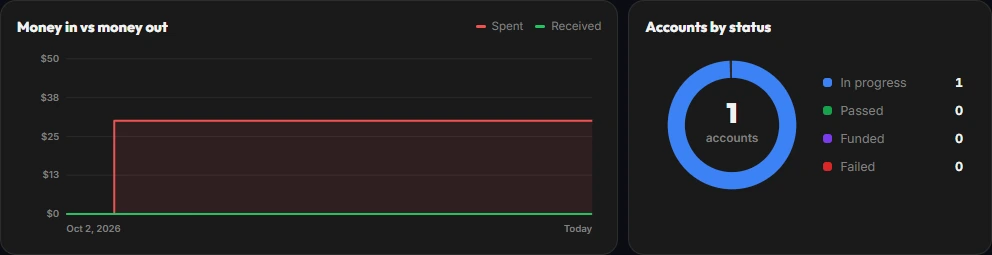
Prop Firm Sync dashboard: total spent, total received, net result, pass rate, funded capital and live accounts FundedNext $5,000 challenge linked to a cTrader account, with profit target, max drawdown, daily loss and minimum trading day rules Money in vs money out chart and accounts by status
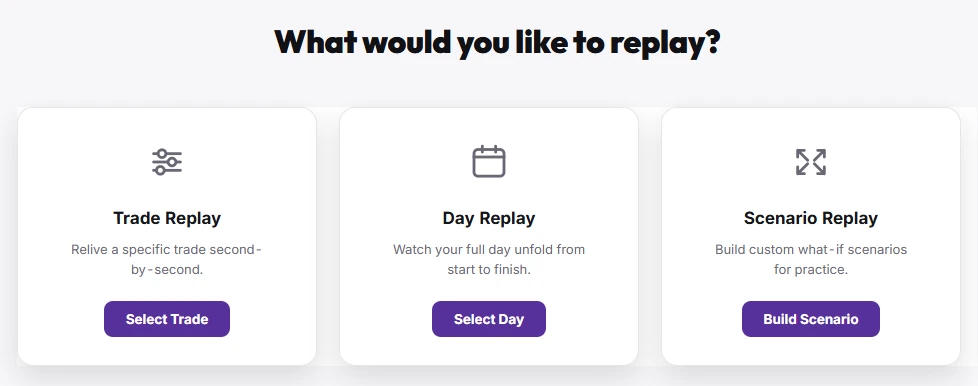
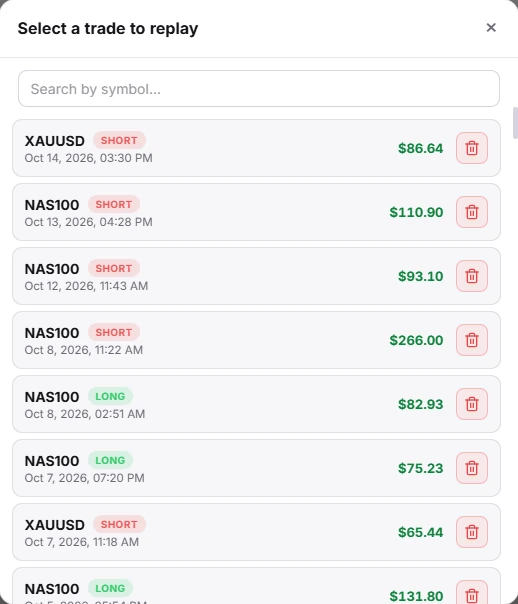
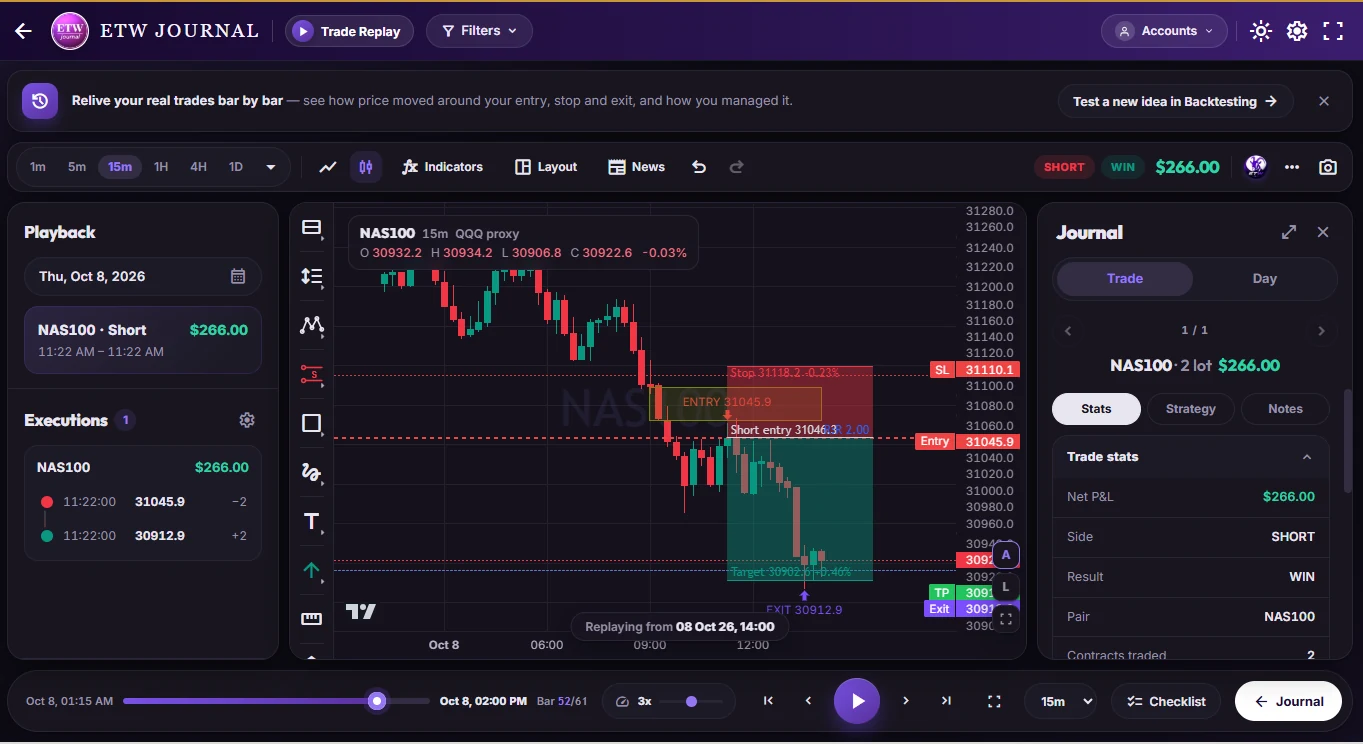
Trade replay of a winning NAS100 short: 15-minute chart with entry, stop loss, target and exit marked, the executions list, journal stats and playback controls Choose what to replay: Trade Replay, Day Replay or Scenario Replay Select a trade to replay: recent NAS100 and XAUUSD trades with their P&L
Trade replay

Replay every trade, bar by bar.

Relive your actual executed trades second by second. See the hesitation, the early exit, the level you should have respected, then fix it for next time.
  • Replay a single trade, a full day, or a what-if scenario
  • Your real entries, exits, stop and target on the chart
  • Variable playback speed from 1m to 1D
  • Pre-trade checklist and journal notes alongside
ETW AI logoETW AI insights

Find what's costing you. In plain English.

ETW AI reads your own journal and surfaces the leaks: missed session prep, skipped checklists, the hours that pay and the habits that don't. It can coach you daily, review a loss, chart your P&L or tag a trade for you.

Try asking
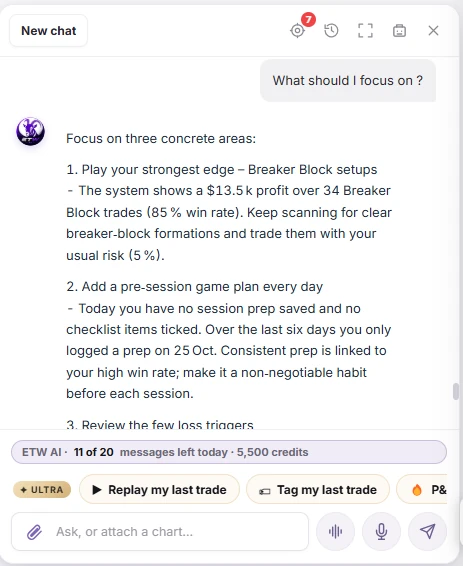
ETW AI answering 'What should I focus on?': play the Breaker Block edge (+$13.5k over 34 trades, 85% win rate), add a pre-session game plan every day, and review the few loss triggers
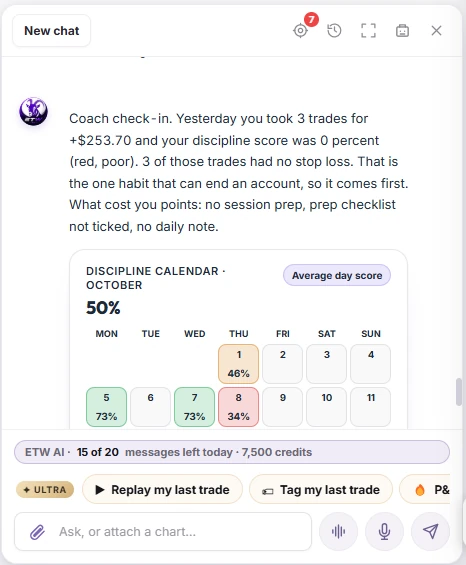
ETW AI coach check-in: yesterday's 3 trades made +$253.70 but scored 0% discipline because none had a stop loss, with the October discipline calendar averaging 50%
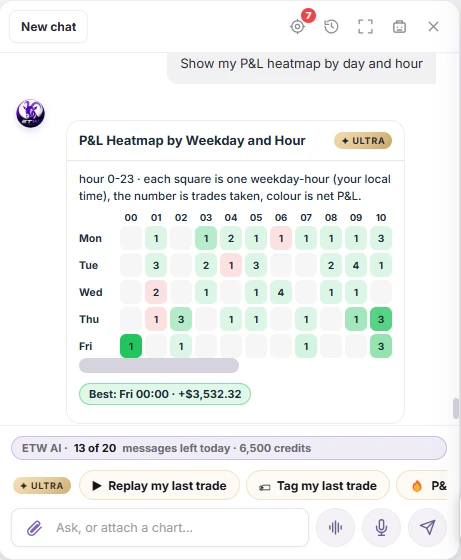
ETW AI P&L heatmap by weekday and hour: trades per hour coloured by net P&L, best slot Friday 00:00 at +$3,532.32
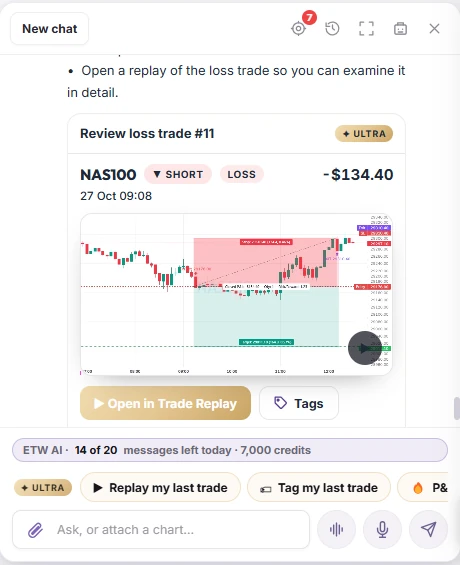
ETW AI loss review card for trade #11: NAS100 short on 27 Oct 09:08, -$134.40, with a chart preview and Open in Trade Replay
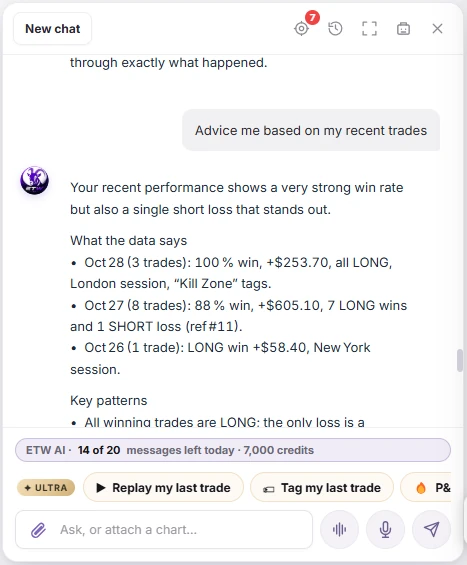
ETW AI advice from recent trades: 28 Oct 100% win rate +$253.70 all long in London, 27 Oct 88% +$605.10 with one short loss, 26 Oct one New York win
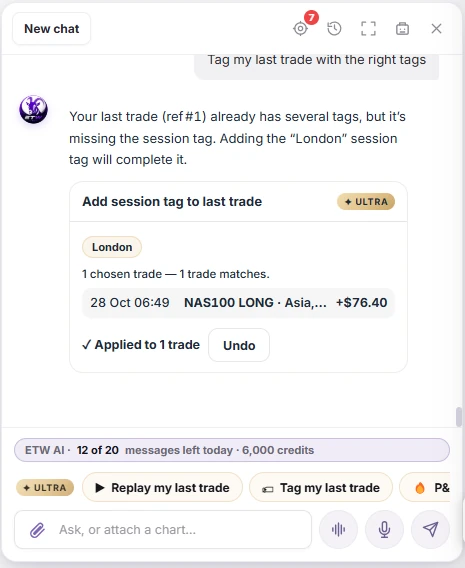
ETW AI adding the missing London session tag to the last trade, NAS100 long on 28 Oct 06:49, +$76.40, applied to 1 trade with undo
Answers come from your own journal1 / 6
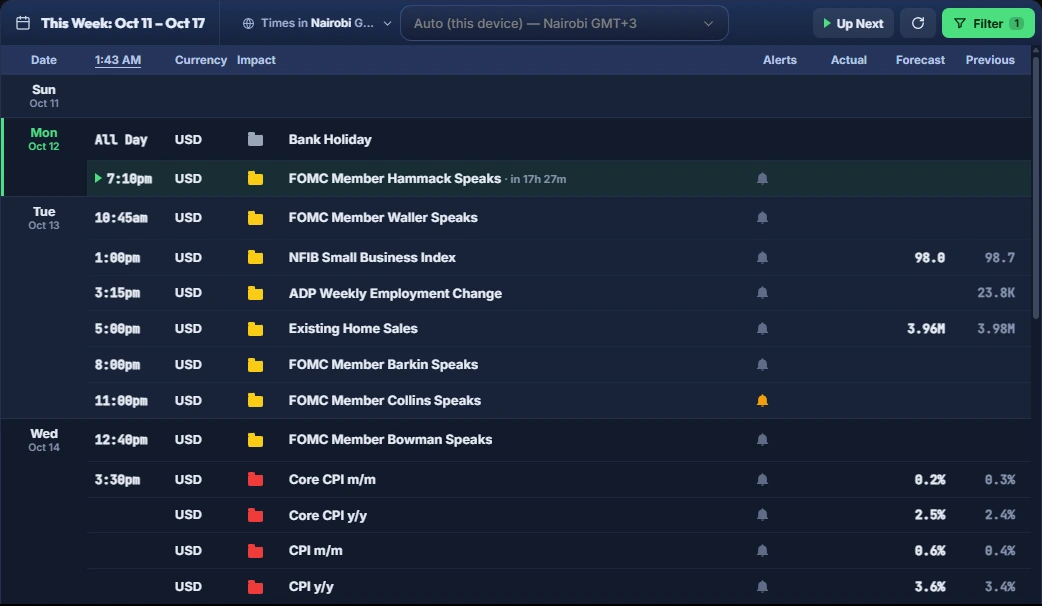
ETW Journal economic calendar for the week: USD events such as FOMC speakers, NFIB index, ADP employment, existing home sales and CPI, with impact folders, alerts, forecast and previous values Calendar filters by impact (high, medium, low, holiday) and currency Up next · FOMC Member Speaks · in 17h 27m
Economic calendar

Know the news before it moves your trade.

A built-in economic calendar inside your journal, shown in your own time zone. See every high-impact release for the week, set alerts, and plan your session prep around them without leaving ETW.

  • High, medium and low impact folders, plus bank holidays
  • Filter by currency or just the pairs you trade
  • Actual, forecast and previous values
  • Alerts and an "Up next" countdown in your time zone
Backtesting

Practise on real price history before risking real money

Replay any market bar by bar, place orders with risk-based sizing, mark up breakers and FVGs, and let ETW AI read the chart or execute trades on your simulated account.
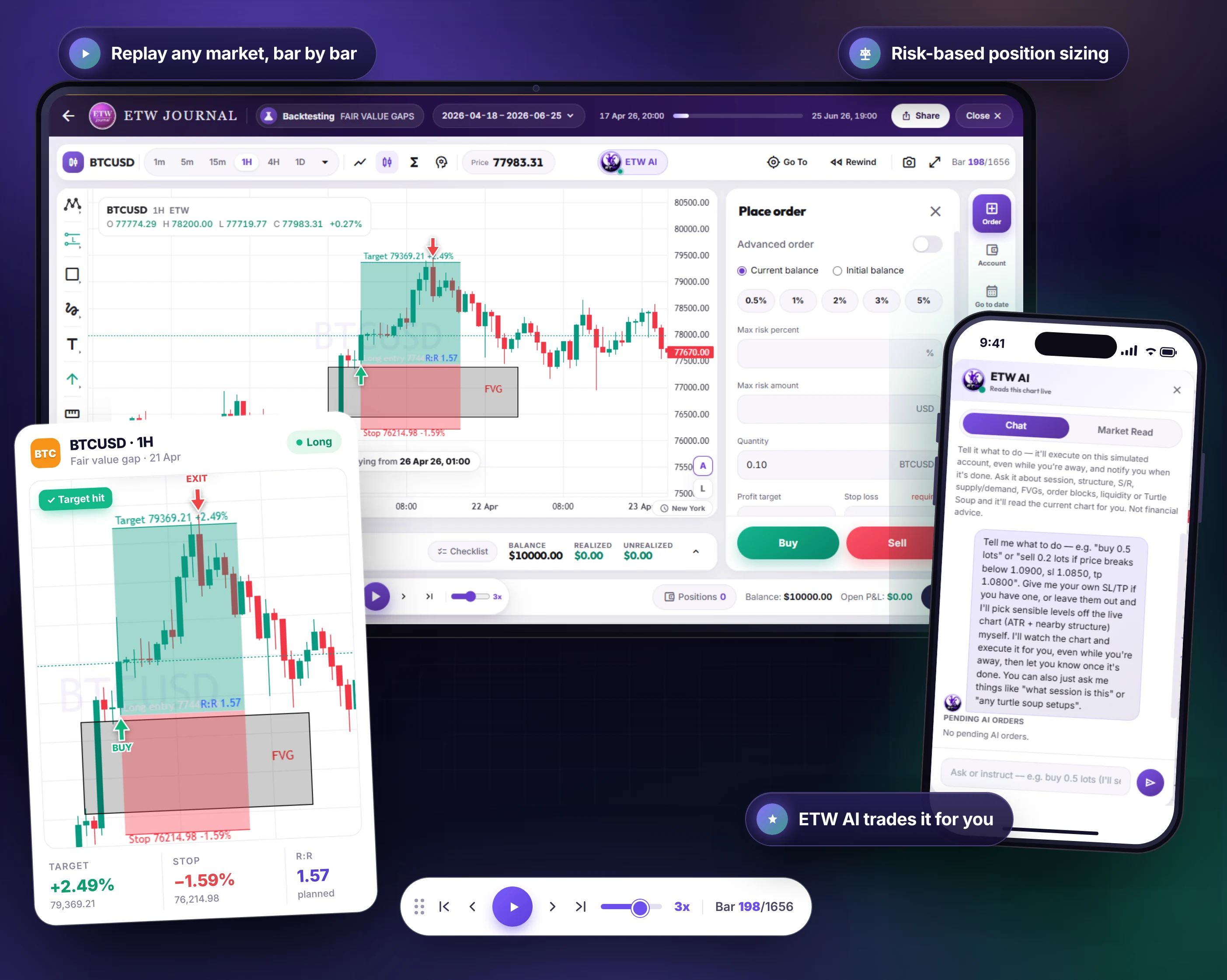
ETW Journal backtesting a BTCUSD 1H fair value gap long on a tablet, with the place order panel for risk-based sizing, a zoomed trade card showing +2.49% target, -1.59% stop and 1.57 R:R, replay controls at 3x, and the ETW AI chat on a phone
Reports

Let your own numbers show you what works

Reports built from your trades, broken down by instrument, month, weekday, rule and tag, so your next decision comes from evidence, not mood.

Know which markets pay you

Every instrument broken down by trades, wins, losses, win rate and net P&L, so you can drop the ones that cost you.
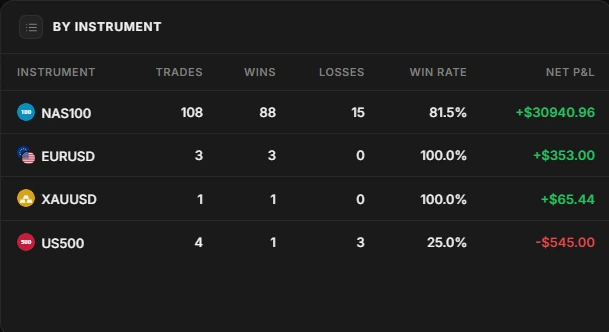
By instrument report: NAS100 108 trades, 81.5% win rate, +$30,940.96; EURUSD, XAUUSD and US500 below

Spot the patterns in your weeks

Monthly and day-of-week P&L show when you trade at your best, and when you should sit on your hands.
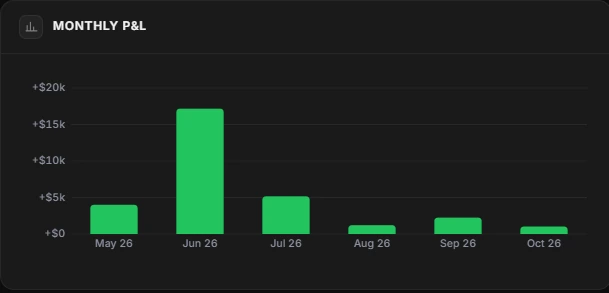
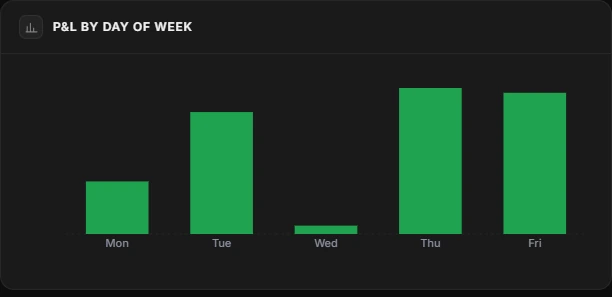
Monthly P&L bar chart from May to October P&L by day of week bar chart, strongest on Thursday and Friday

Prove your rules work

Rule compliance compares the trades where you followed your plan with the ones where you broke it.
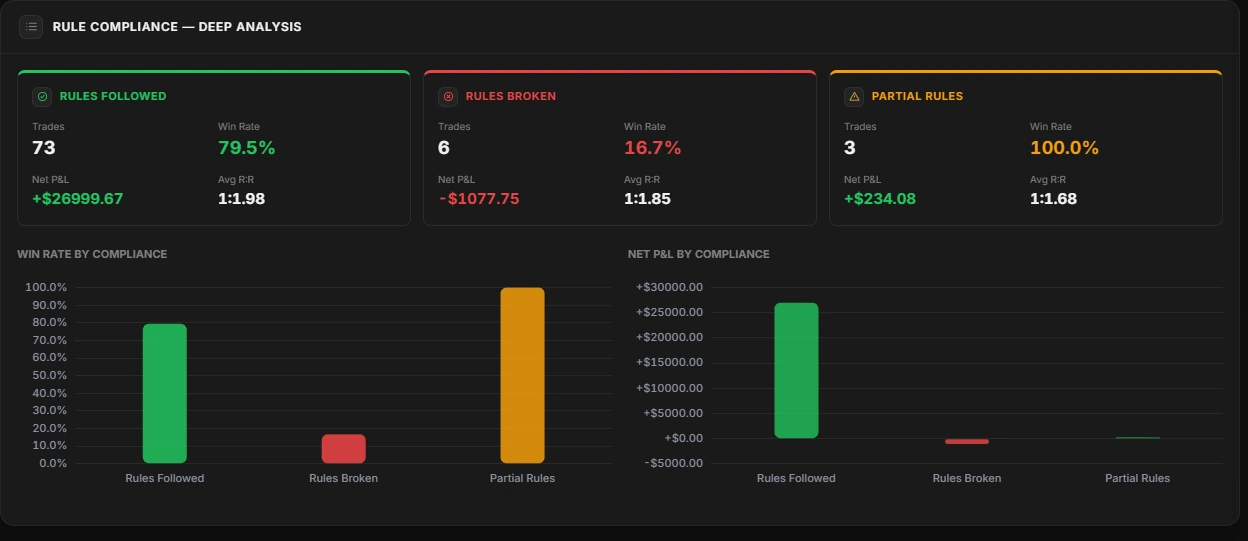
Rule compliance deep analysis: rules followed 73 trades, 79.5% win rate, +$26,999.67; rules broken 6 trades, 16.7% win rate, -$1,077.75

See which habits pay

Tag your mindset, execution and process, and every tag gets its own win rate and P&L. Calm pays. Chasing doesn't.
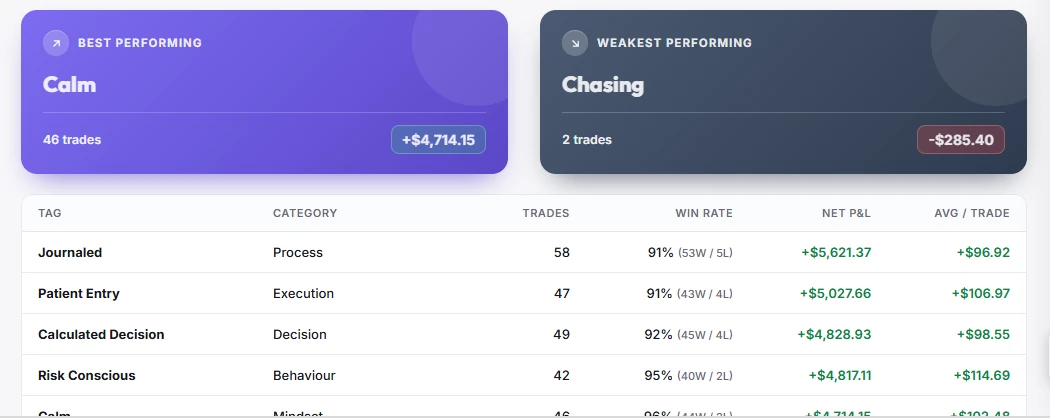
Tag performance report: best tag Calm, 46 trades, +$4,714.15; weakest tag Chasing, 2 trades, -$285.40; table with Journaled, Patient Entry, Calculated Decision and Risk Conscious

Put tags head to head

Compare up to four tags on eleven metrics. The better value on each line is highlighted for you.
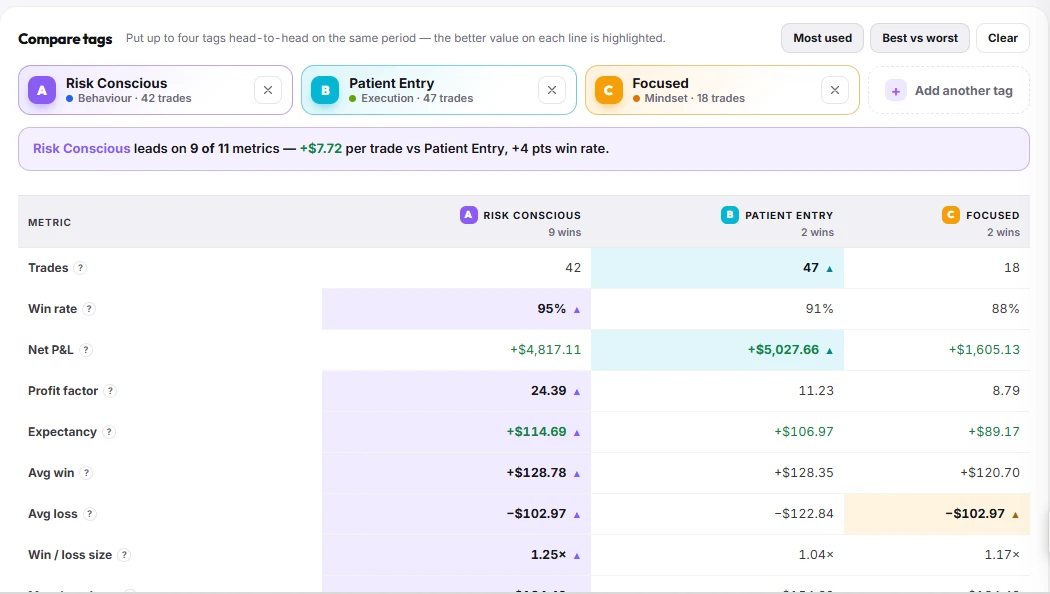
Compare tags: Risk Conscious leads Patient Entry and Focused on 9 of 11 metrics, with a 95% win rate and 24.39 profit factor

Tag a trade in seconds

Pick entry timeframe, ICT model, PD array, session and more from your own categories, or make new ones.
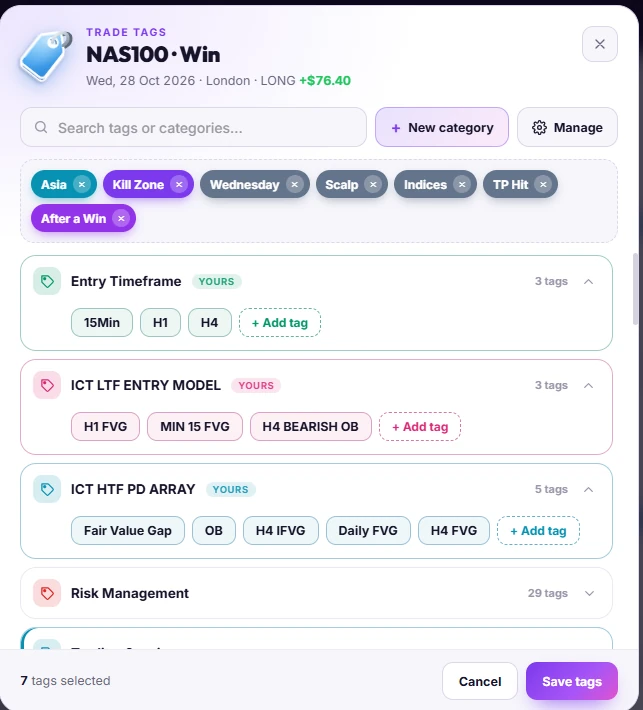
Trade tags panel for a winning NAS100 London long: selected tags Asia, Kill Zone, Wednesday, Scalp, Indices, TP Hit and After a Win, with categories for entry timeframe, ICT entry model and HTF PD array
Playbooks

Is your strategy actually profitable?

Build a playbook for every setup, track how closely you follow it, and find out which strategies really make you money.

Write your rules, then track them

Turn your setup into a checklist and see the follow rate, net P&L, profit factor and win rate of every rule.
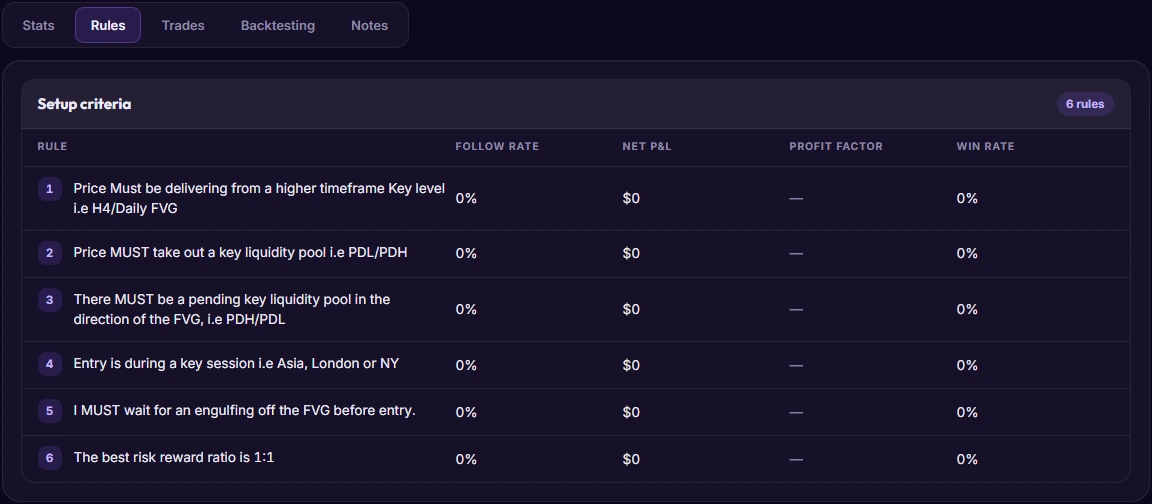
Playbook rules tab: six setup criteria for an FVG model, each with follow rate, net P&L, profit factor and win rate

See how each playbook performs

Trades, win rate, profit factor, average winner and average loser for every strategy you trade.
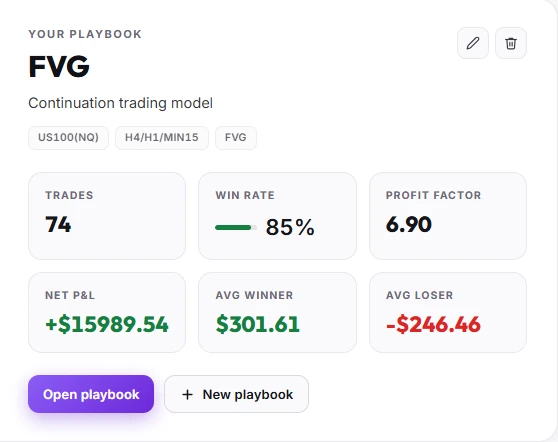
FVG playbook: 74 trades, 85% win rate, profit factor 6.90, net P&L +$15,989.54, average winner $301.61, average loser -$246.46

Learn from ETW mentors' playbooks

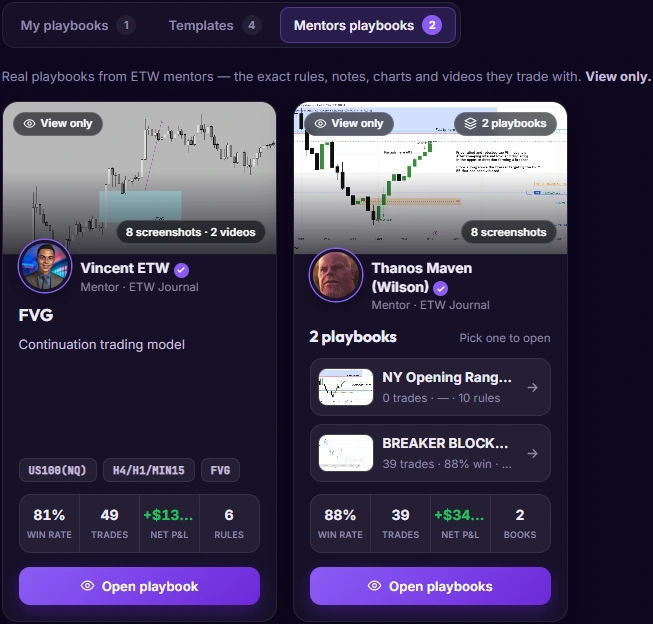
Open real playbooks from ETW mentors, with the exact rules, notes, charts and videos they trade with. Start from a template, or study a mentor's model before you build your own.
  • Mentor playbooks
  • Templates
  • Rules & checklists
  • Screenshots & videos
Mentor playbooks: Vincent ETW's FVG playbook with 81% win rate over 49 trades, and two playbooks from another mentor

Rank every strategy you trade

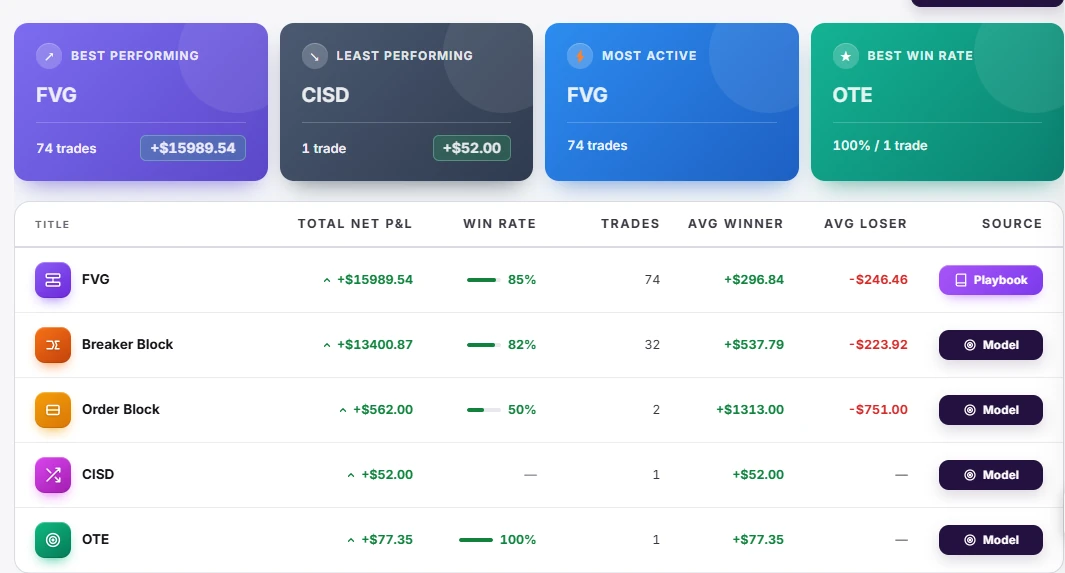
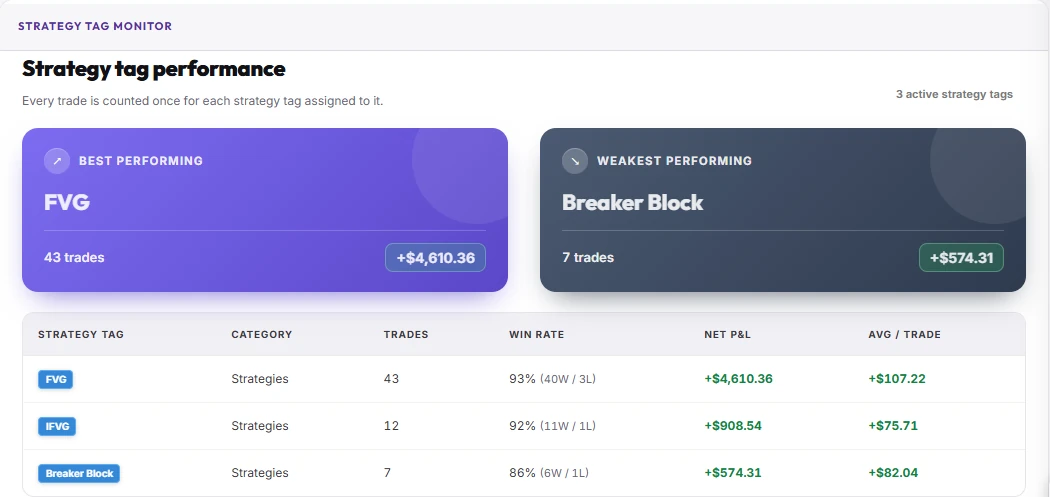
Your best, weakest and most active models side by side: FVG, Breaker Block, Order Block, CISD, OTE. Strategy tags count each trade once per tag, so you see exactly which setup carries your P&L.
  • Best & least performing
  • Win rate per model
  • Avg winner & loser
  • Strategy tags
Strategy performance: FVG best performing with 74 trades and +$15,989.54, Breaker Block +$13,400.87, Order Block, CISD and OTE, with win rate, average winner and loser for eachStrategy tag performance: FVG 43 trades 93% win rate +$4,610.36, IFVG 12 trades 92%, Breaker Block 7 trades 86%
Notebook & session prep

Plan the day. Write it down. Stick to it.

Daily notes, session prep and a discipline calendar live next to your trades, so your plan and your results are always in the same place.

A notebook that knows your trades

Folders for your model, daily notes and session prep, with each note linked to the trades you took that day and their P&L.
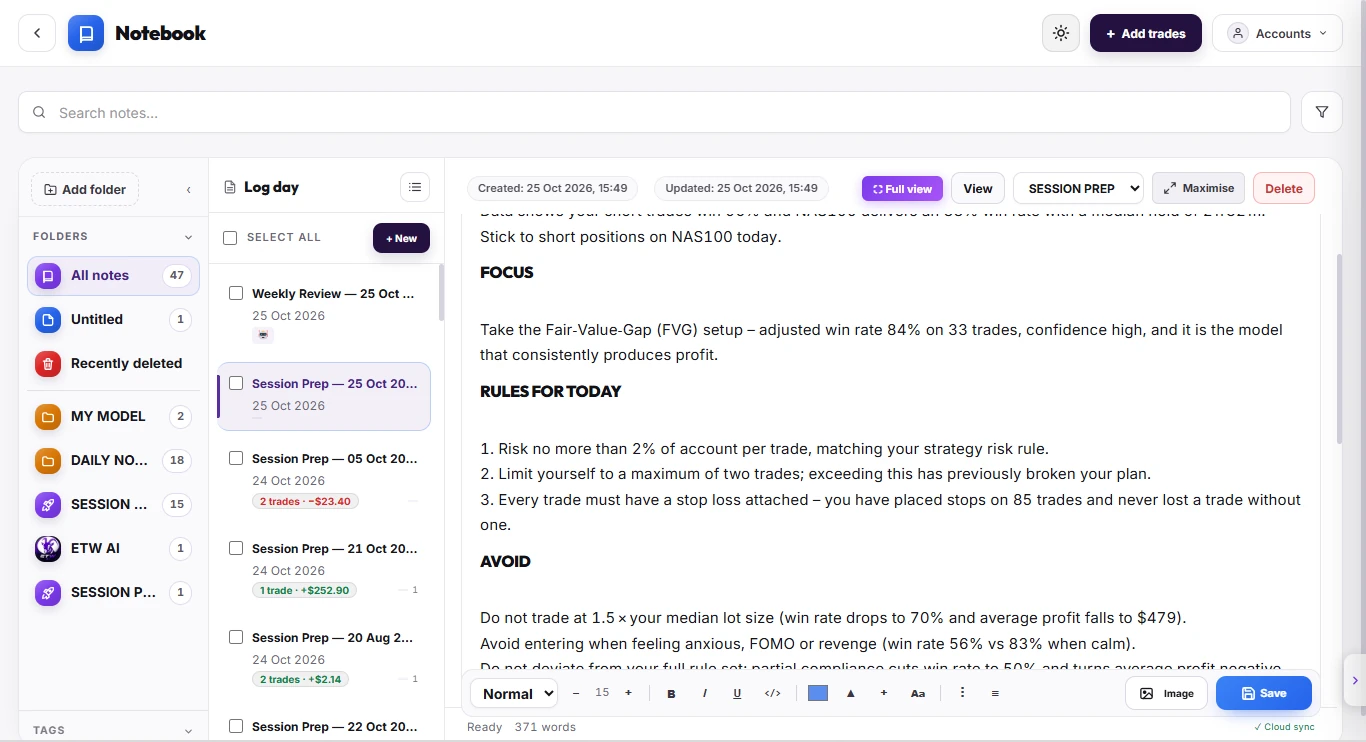
ETW Journal notebook: folders for My Model, Daily Notes and Session Prep, a list of notes with linked trades and P&L, and a session prep note with focus, rules for today and things to avoid

Score your discipline daily

Every day earns discipline points from your trades and habits. Green days build streaks; red days show where the plan slipped.
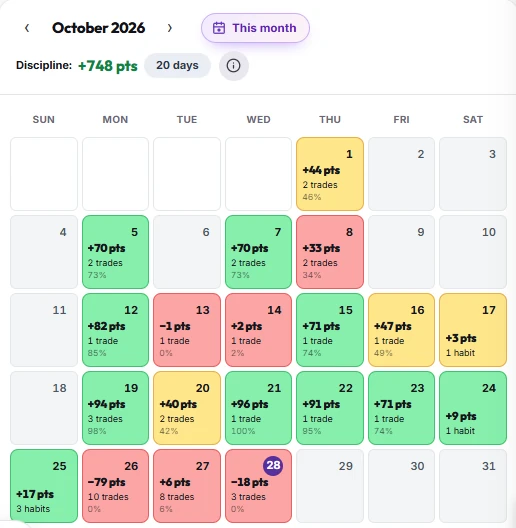
October 2026 discipline calendar: +748 points over 20 days, with daily point totals coloured green, amber and red

Session prep before every session

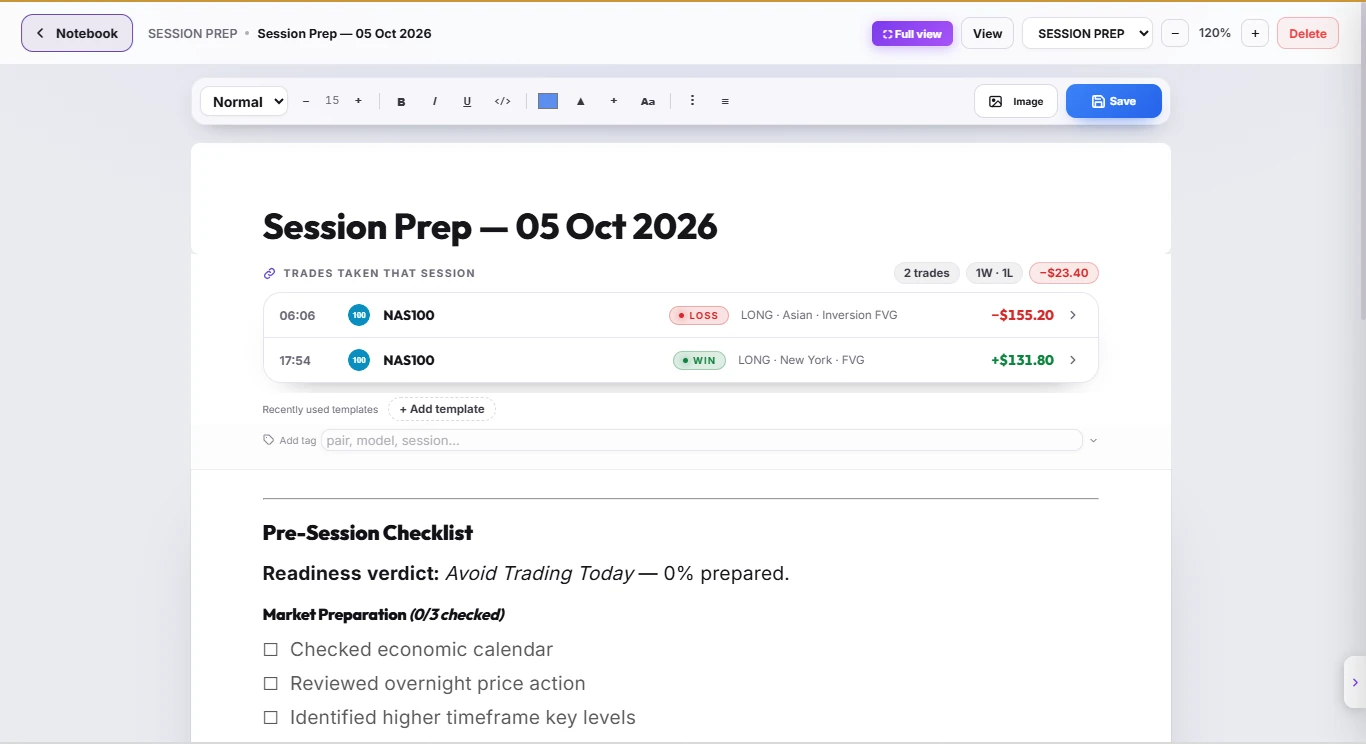
Work through a pre-session checklist and get a readiness verdict before you trade. Afterwards, the trades you took are attached to the note so you can see if you followed it.
  • Pre-session checklist
  • Readiness verdict
  • Linked trades
  • Templates & tags
Session prep note for 5 October 2026: two NAS100 trades taken that session, one win and one loss, net -$23.40, and a pre-session checklist with readiness verdict
Community

You don't have to trade alone

Learn from verified ETW mentors, get feedback on your real trades, and join live sessions with other traders.

ETW University

Book sessions with verified ETW mentors and join live Spaces: group audio rooms where mentors break down charts on screen.
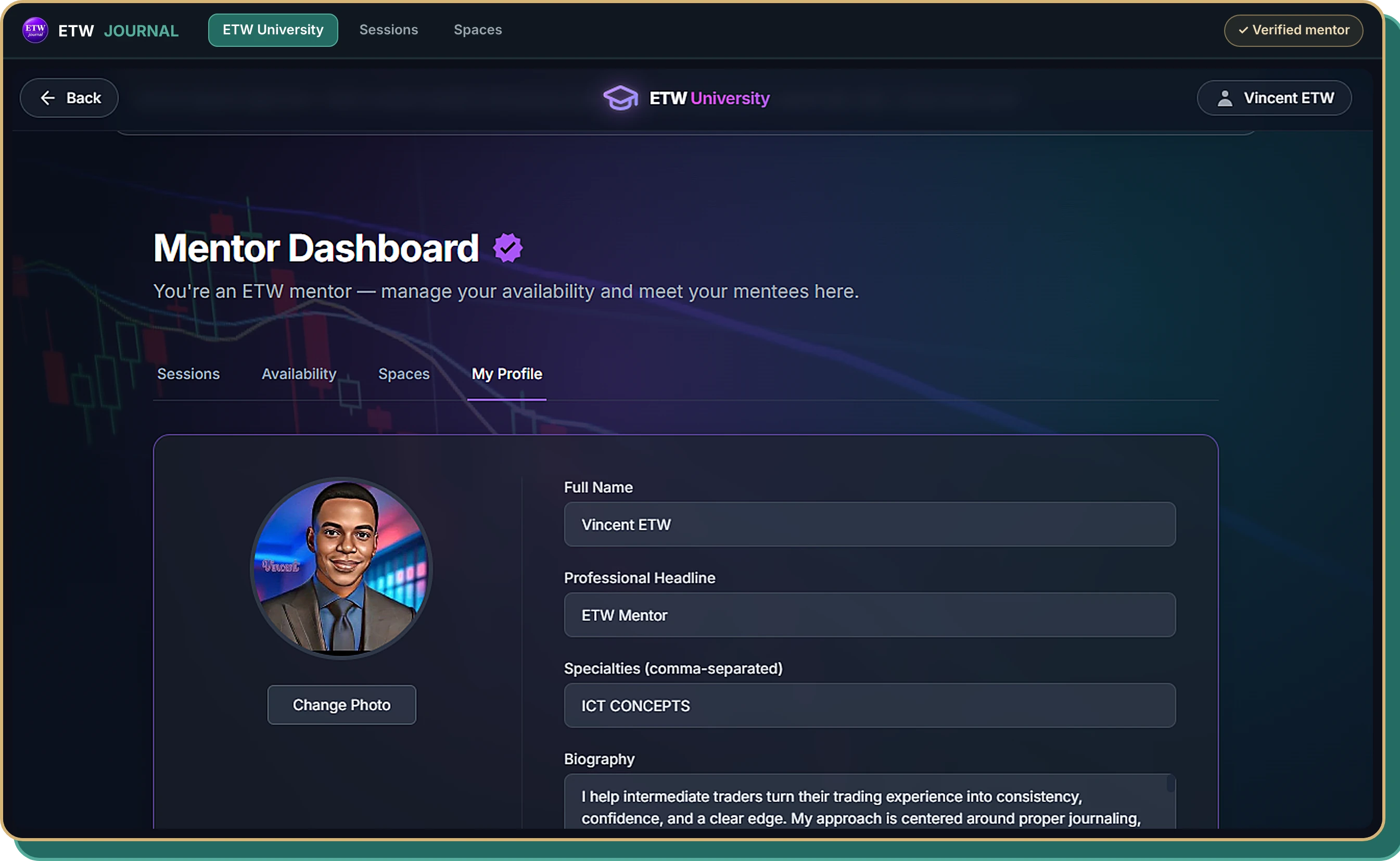
ETW University Mentor Dashboard: a verified mentor's profile with photo, headline, specialties and biography Live 1-on-1 & group sessions ✓ Verified ETW mentors

Mentor Mode

Your mentor sees your stats, trades, playbooks and journal, and chats with you about them right inside ETW Journal.
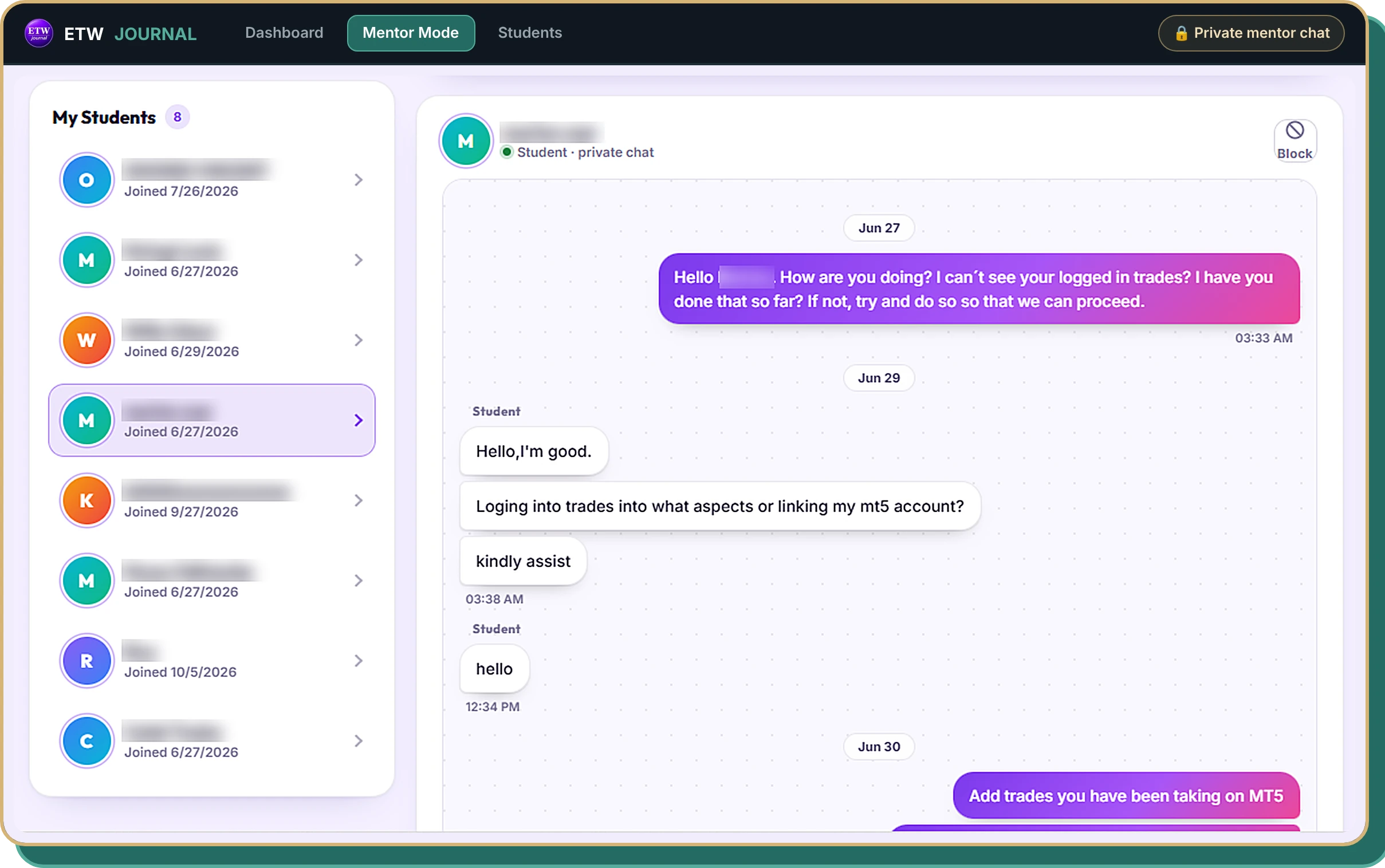
Mentor Mode: a mentor's student list and a private chat with a student about logging trades (student names blurred)

From ETW Journal Share Studio

Post the real numbers.

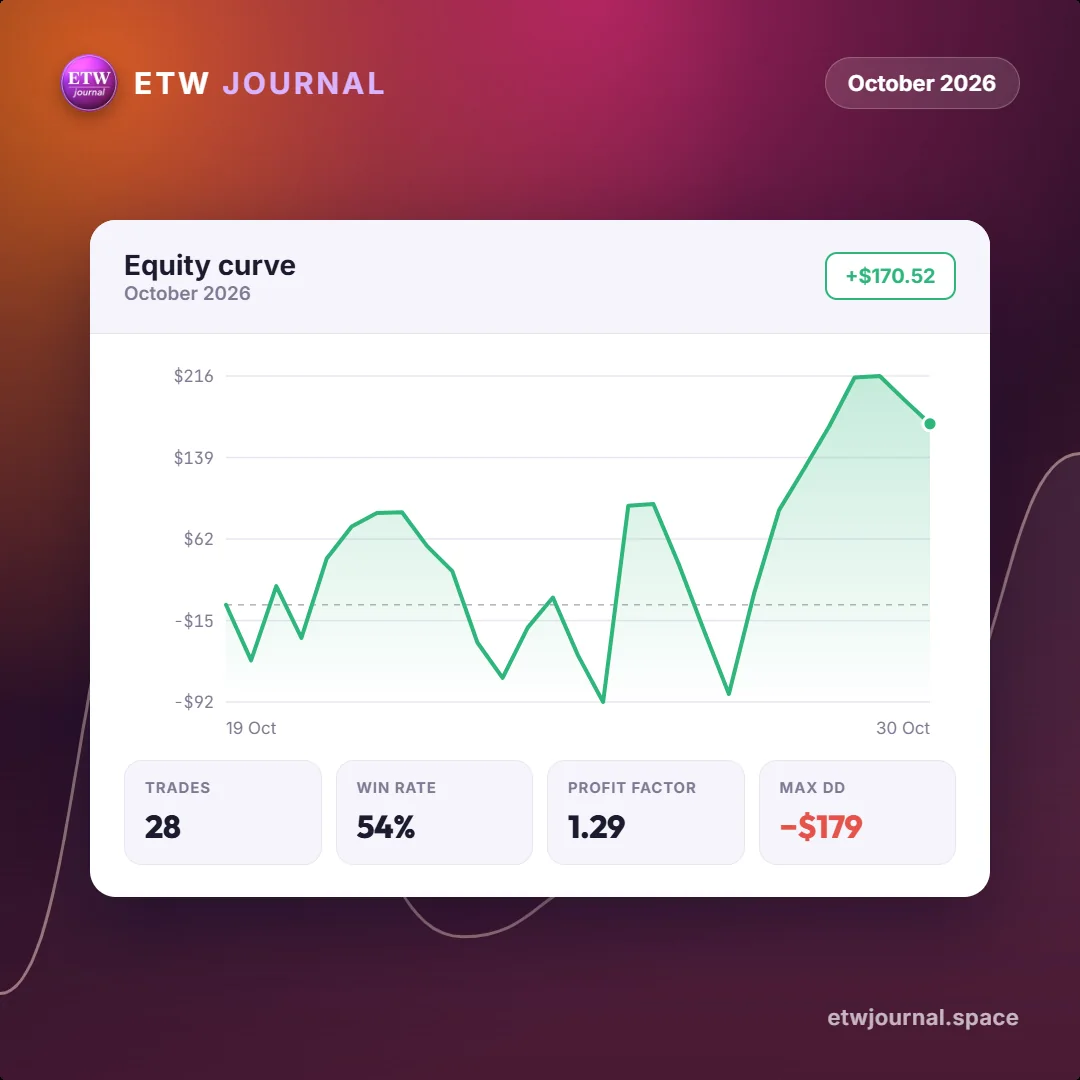
Share Studio turns your journal into clean, square cards: your P&L calendar, equity curve, best tags or a single trade. Losses stay in, so what you post is what actually happened. Go dark, light, or put your own photo behind it.
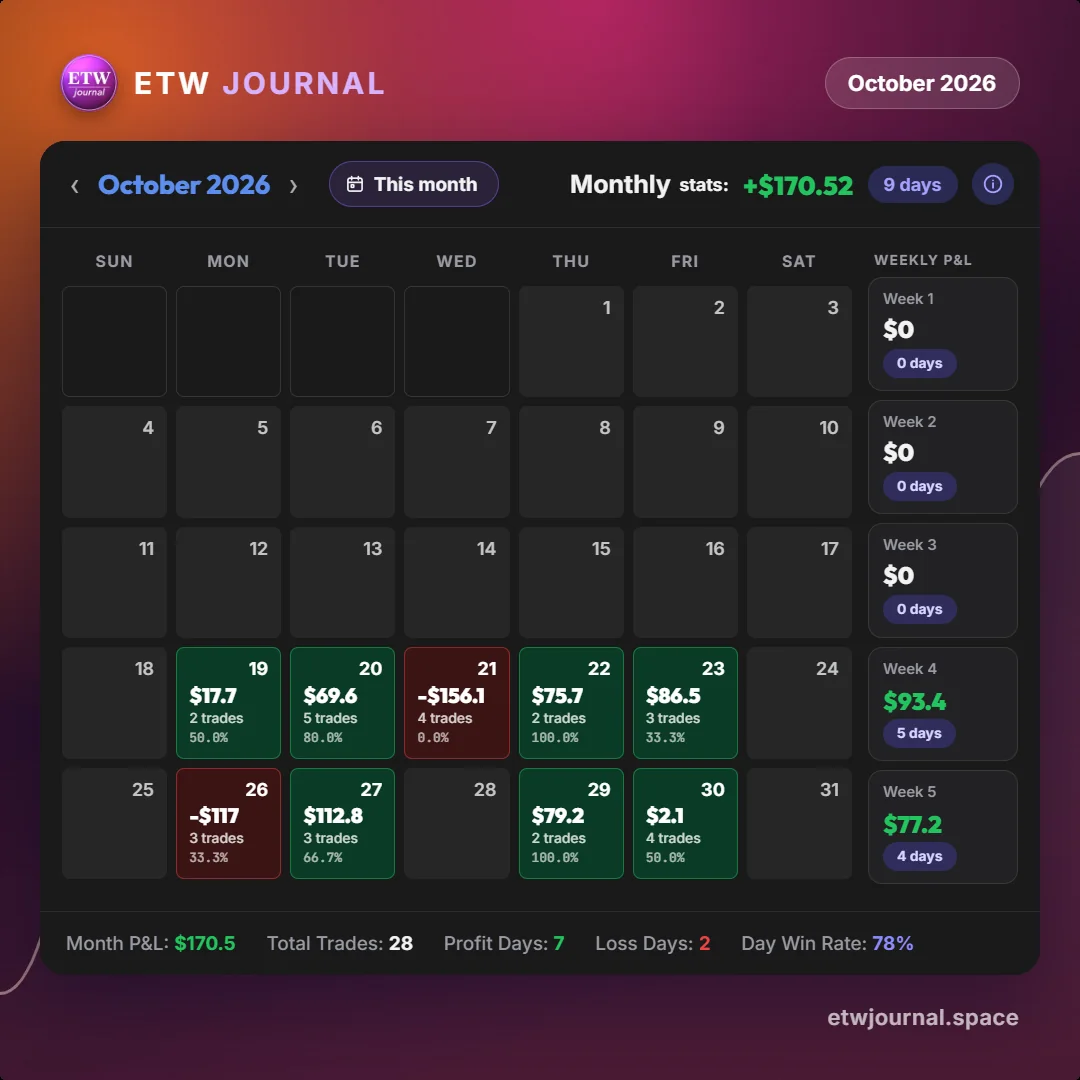
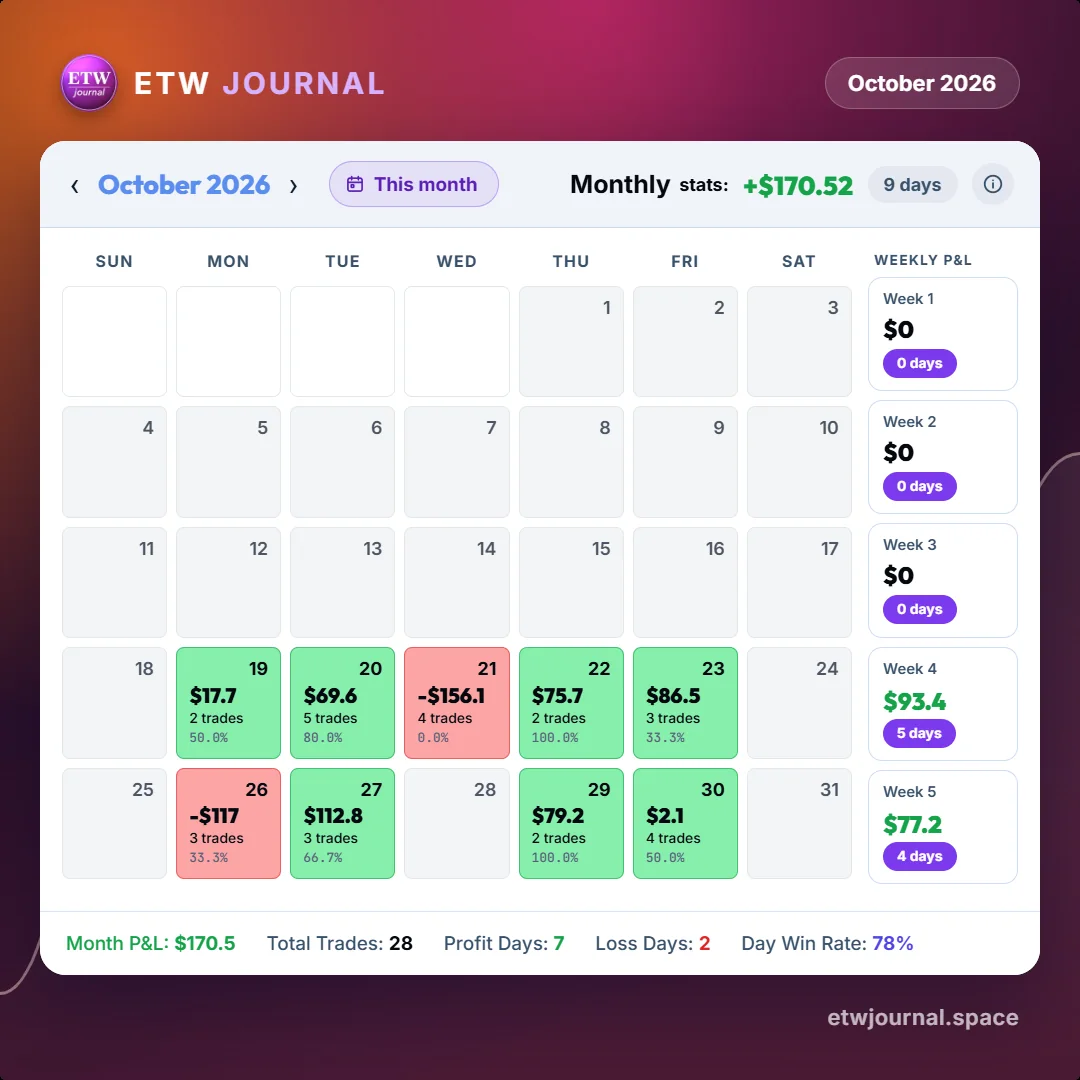
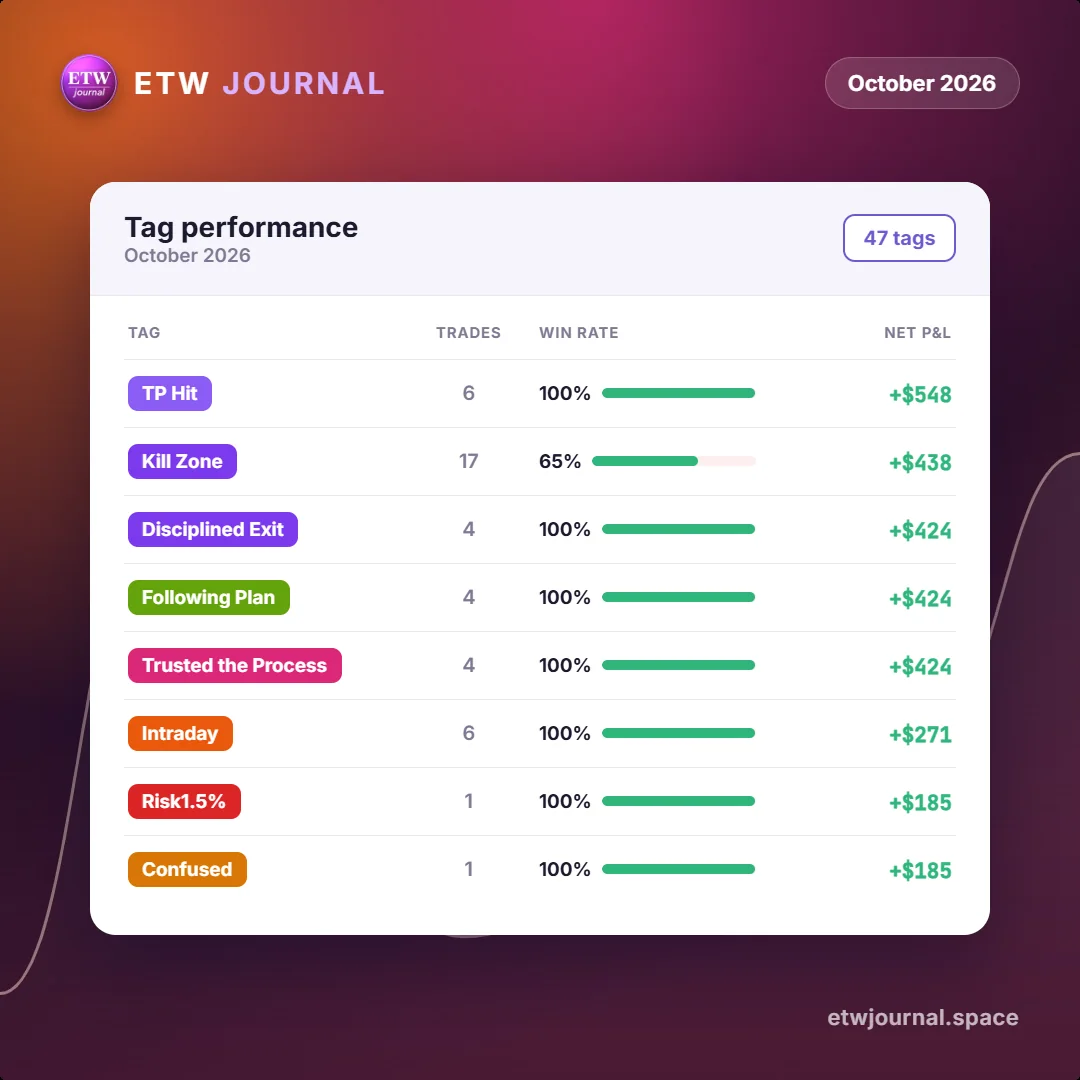
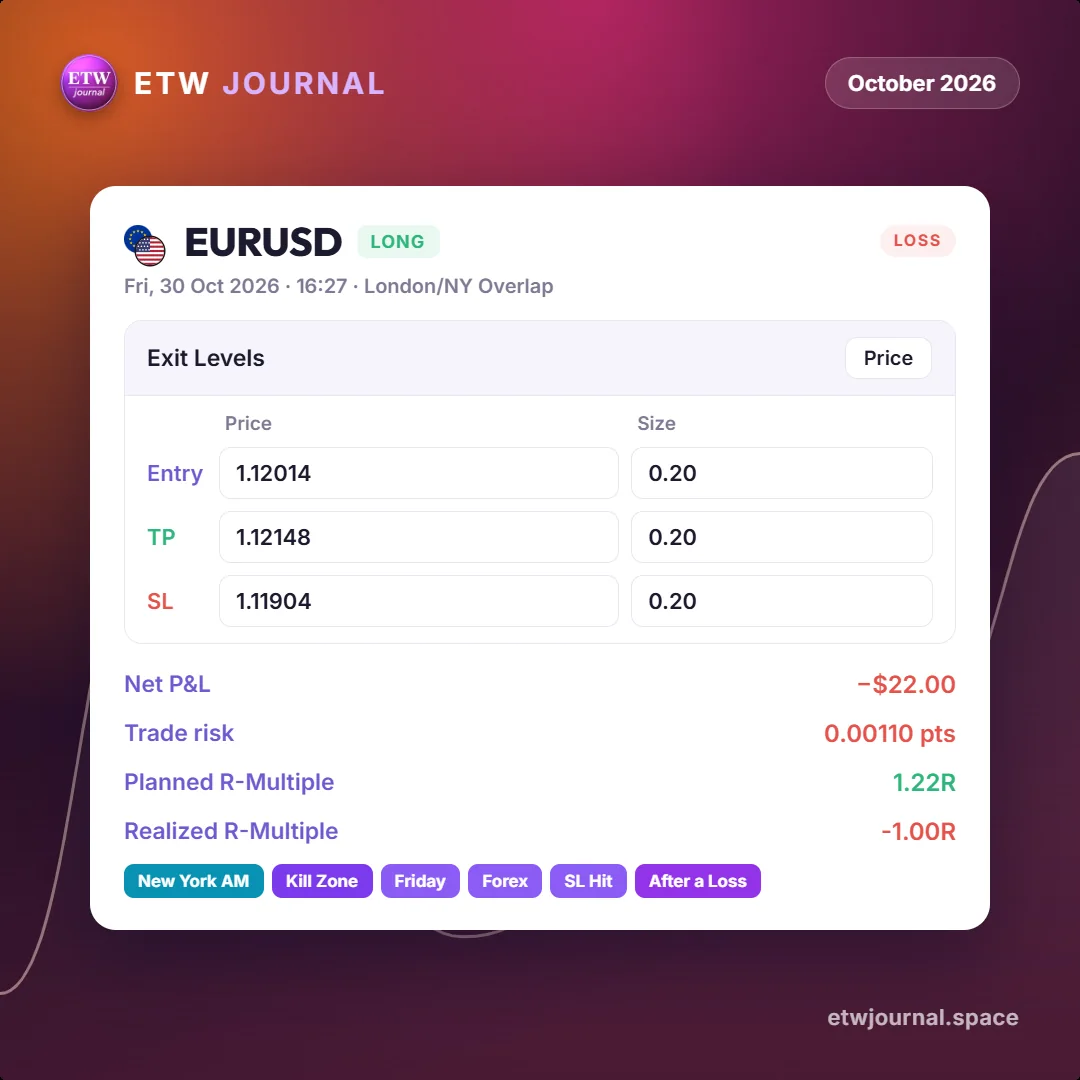
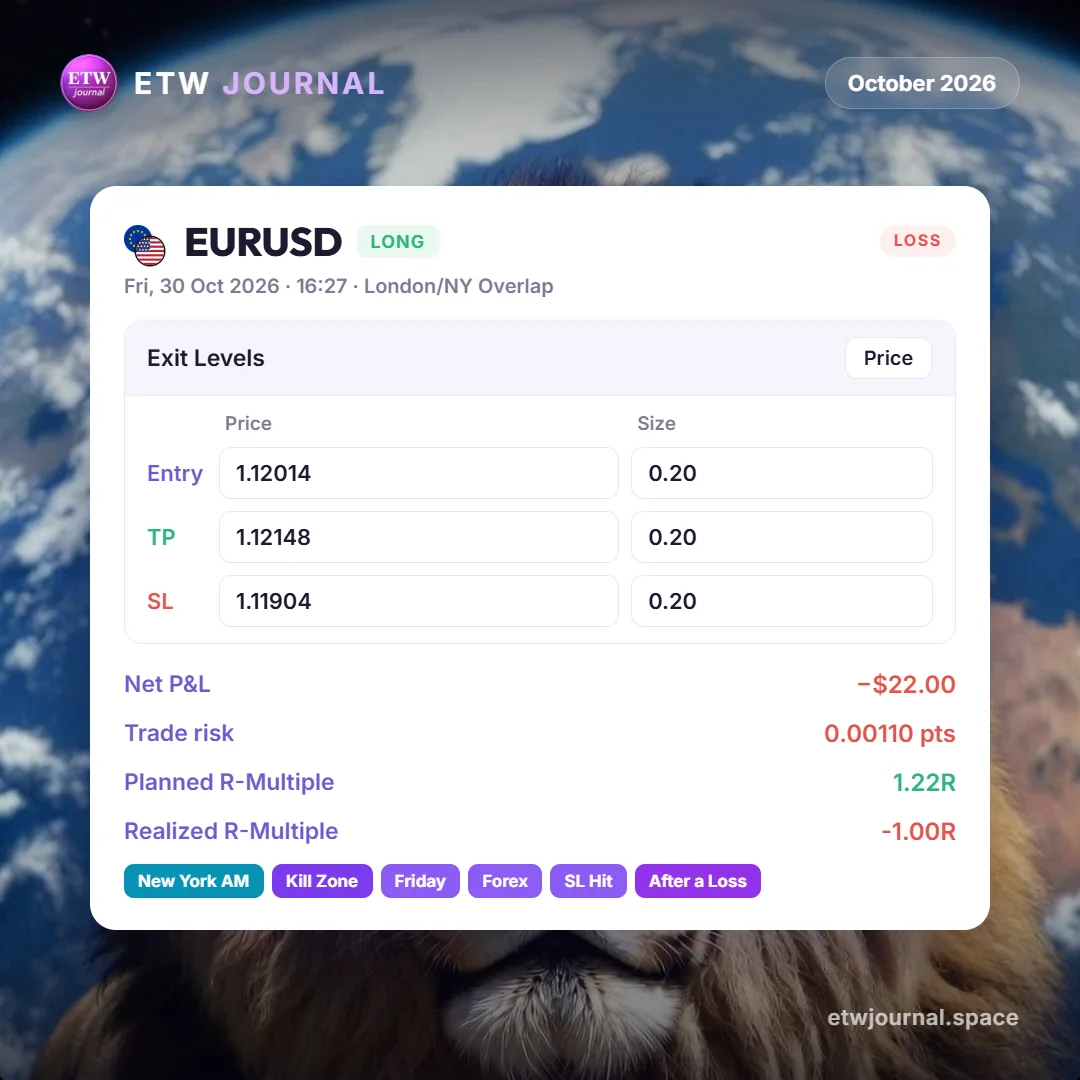
P&L calendar card in dark mode: October 2026, +$170.52 over 9 trading days, with weekly P&L The same October 2026 P&L calendar card in light mode Equity curve card for October 2026: +$170.52, 28 trades, 54% win rate, profit factor 1.29, max drawdown -$179 Tag performance card for October 2026, led by TP Hit at +$548 and Kill Zone at +$438 Single trade card: EURUSD long on 30 Oct 2026, stopped out for -$22.00 and -1.00R The same EURUSD trade card on a custom photo background
Calendar, dark
How it works

Up and running in three steps

From sign-up to your first real report in under five minutes.
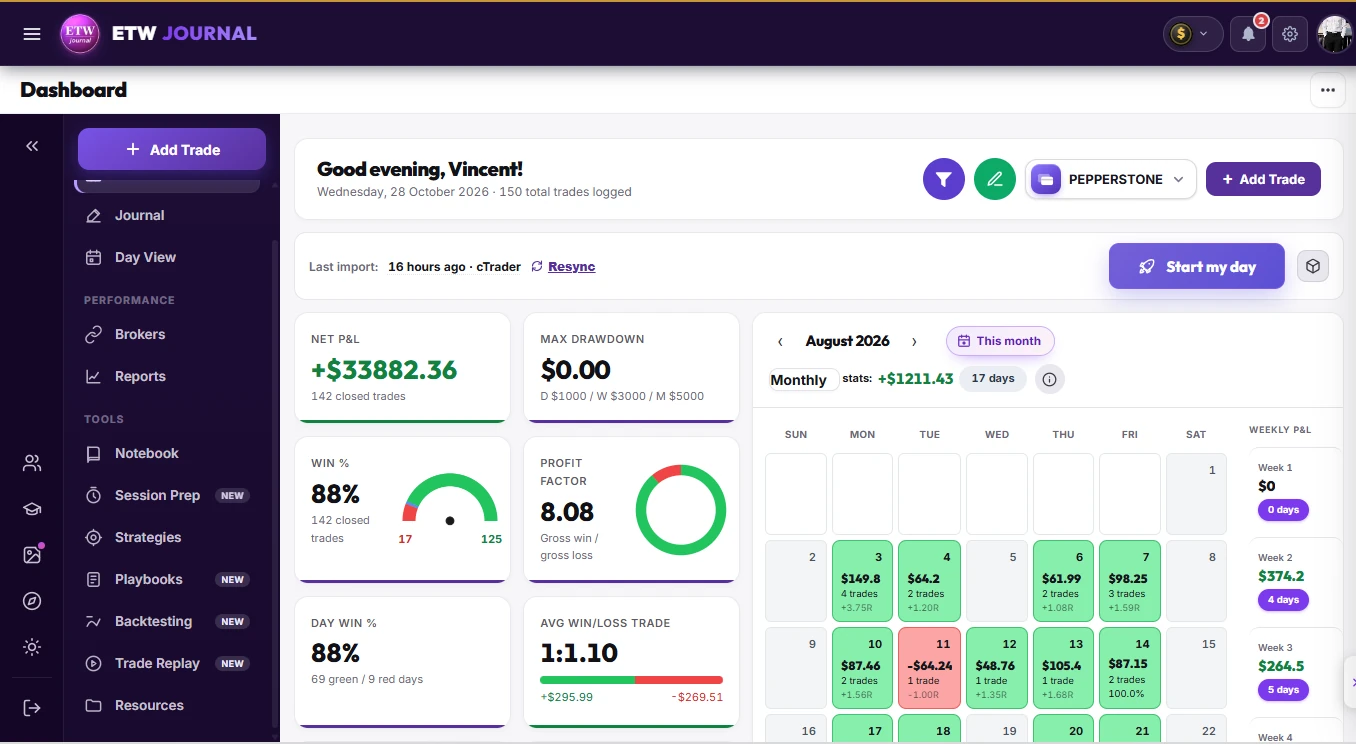
etwiz.space / dashboard
ETW Journal dashboard in light mode: net P&L +$33,882.36, 88% win rate, profit factor 8.08, day win rate and the August 2026 P&L calendar The same ETW Journal dashboard in dark mode
Your trading routine, in one clear view · light or dark
01

Sign up

With one click via Google, or an email address.

02

Connect MT5 or cTrader

Add your account credentials once. Trades sync automatically from then on, no manual logging needed.

03

Get your first report

Review win rate, average RR, and your equity curve, then start building a routine around what's actually working.


Platforms & brokers

Journal the accounts you already trade

  • XM
  • Pepperstone
  • TradeLocker
  • JustMarkets
  • HFM
  • FundedNext
  • FTMO
  • Interactive Brokers
  • Exness
  • MetaTrader 5
  • MetaTrader 4
  • IC Markets
Reviews

In traders' own words

Pricing

Simple pricing. Serious edge.

Everything you need for consistent profitability

One AI trading partner that journals, backtests, and reviews every session — so you can focus on the next trade.

Stop guessing why last month worked and this one didn't. Every trade gets logged, every pattern gets surfaced, and every session ends with a clearer edge than the one before — so the only thing left to decide is which plan gets you there faster.

Cancel any time

No spreadsheets. No guesswork. Just the edge you've been missing.

Essential

Best for traders building a consistent routine.

$7/mo
billed monthly
Get Started
  • ✓Add trades
  • ✓Journals
  • ✓Stats & Analytics
  • ✓Brokers sync — cTrader, TradeLocker & DXtrade
  • ✓MT5 / MT4 EA live sync & history import
  • ✓Reports & Progress
  • ✓2 independent accounts · 1 MT5 each
  • ✕MT5 & MT4 direct connect (login & server)
  • ✕Mentor mode
  • ✕ETW AI
  • ✕Trade replay
  • ✕Backtesting

Move up to Pro or Ultra any time — switching takes a couple of clicks.

✦ Everything unlocked
Ultra

For serious and funded traders running several accounts — every feature, the highest limits and priority support.

$39/mo
billed monthly
Get Ultra
  • ✓Everything in Pro
  • ✓10 independent accounts · 1 MT5 each
  • ✓ETW AI — 10,000 daily AI credits
  • ✓Voice chat with ETW AI
  • ✓Unlimited trade replay
  • ✓Unlimited backtesting, backed up to the cloud
  • ✓Unlimited ETW University sessions
  • ✓Priority support

Secure checkout by Gumroad. Pay with the same email as your ETW Journal account so your plan unlocks automatically.

Payment methods
  • Visa
  • Mastercard
  • Google Pay
FAQ

Frequently asked questions

Your next review starts with one connection

Link MT5 or cTrader in a few minutes and watch your history fill in.

Get started →