Comparison
ETW Journal vs Notion as a Trading Journal (2026)
We compare Notion — the all-purpose workspace many traders turn into a journal — against ETW Journal, a trading journal that syncs straight from MT5, MT4 and cTrader, to help you decide when a Notion template is enough and when dedicated software starts paying for itself.

Short on time? Here's the verdict.
With Notion, you are the database admin: you build the template, type every trade and maintain the formulas that turn rows into statistics. With ETW Journal, trades arrive from MT5, MT4, cTrader, TradeLocker or DXtrade on their own, and win rate, profit factor, session and setup breakdowns are calculated for you. Notion works if you take a handful of trades a week and mostly want a place for notes and plans. Once you trade daily, run more than one account or sit prop challenges, the typing and formula upkeep becomes the reason journaling stops.
 Choose ETW Journal if:
- You want trades imported automatically from MT5, MT4, cTrader, TradeLocker or DXtrade
- You want stats, reports and a P&L calendar without building a single formula
- You need trade replay, backtesting, prop firm tracking or AI review of your own data
Choose Notion if:
- Your journal lives inside a Notion workspace you already use for life and business
- You want total control over every field, view and layout
- You trade a few times a week, write long reflections and want to pay $0
Feature comparison
Side-by-Side Feature Comparison
Quick comparison — ETW Journal vs Notion
| Feature | ETW Journal | Notion |
|---|---|---|
| Starting price | $7/mo Essential · $15/mo Pro | Free · Plus $10/member/mo · Notion AI fully included from Business ($20/mo) |
| Broker auto-sync | MT5, MT4, cTrader, TradeLocker, DXtrade | None — manual entry or CSV import |
| Past trade history | Full available history imported on first connect | Export from MT5, clean it, then import |
| Trading statistics | Net P&L, win rate, profit factor, avg R:R, drawdown — automatic | Build with formula & rollup properties |
| P&L calendar | Green/red daily heatmap with weekly totals | Calendar view of rows; P&L shading needs workarounds |
| Reports | By instrument, weekday, month, session, rule compliance, Tag Lab | Chart views you design and maintain |
| AI | ETW AI answers from your trades, notes & checklists (Pro) | Notion AI — a general writing & workspace assistant |
| Trade replay | Single trade, full day or what-if scenario (Pro) | Not available |
| Backtesting | 3 sessions (Essential) · 10 (Pro) | Not available |
| Prop firm tracking | Rules, fees & payouts checked against synced trades | Manual tables |
| Mentor access | Mentor Mode — read-only access to real data (Pro) | Share pages or invite guests |
| Free plan | No — from $7/mo | Yes |
| Best for | Active traders who want the journal to fill itself | Note-takers who want one workspace for everything |
IncludedPartial / with workaroundsNot available
Broker sync
Can Notion replace automatic broker sync?
The most fundamental difference is where the numbers come from. In Notion every trade is a database row you fill in by hand — symbol, direction, entry, exit, stop, size, P&L, session, setup. That's 8–12 fields per trade. At four trades a day that's roughly 800 fields a month, and one typo quietly breaks every rollup that depends on it.
ETW Journal connects once to MT5, MT4, cTrader, TradeLocker or DXtrade, imports your full available history, then keeps syncing as trades close. Your journal matches your account without you touching a keyboard — which is exactly why you keep using it.
Connections are read-only: ETW can see trade history but can never place trades or move funds.
See how syncing works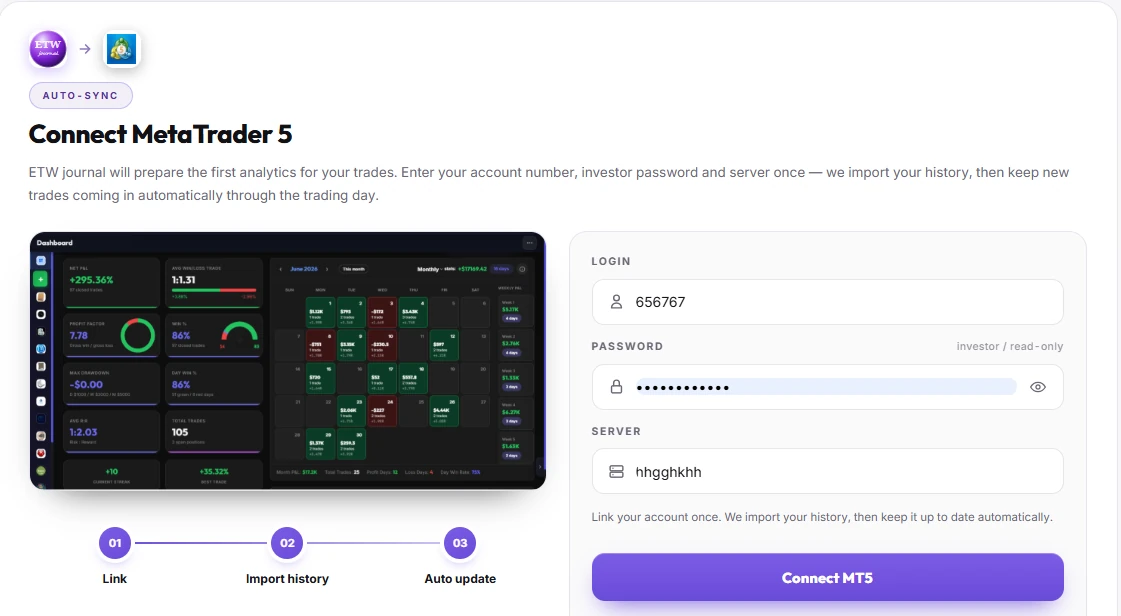





Analytics
Formulas you maintain vs. stats that maintain themselves
Notion can calculate — with formula properties, rollups and patience. Win rate needs a formula. Profit factor needs two filtered sums and a division. Win rate by session needs grouped views or a second database. Add a new field later and you're back editing formulas.
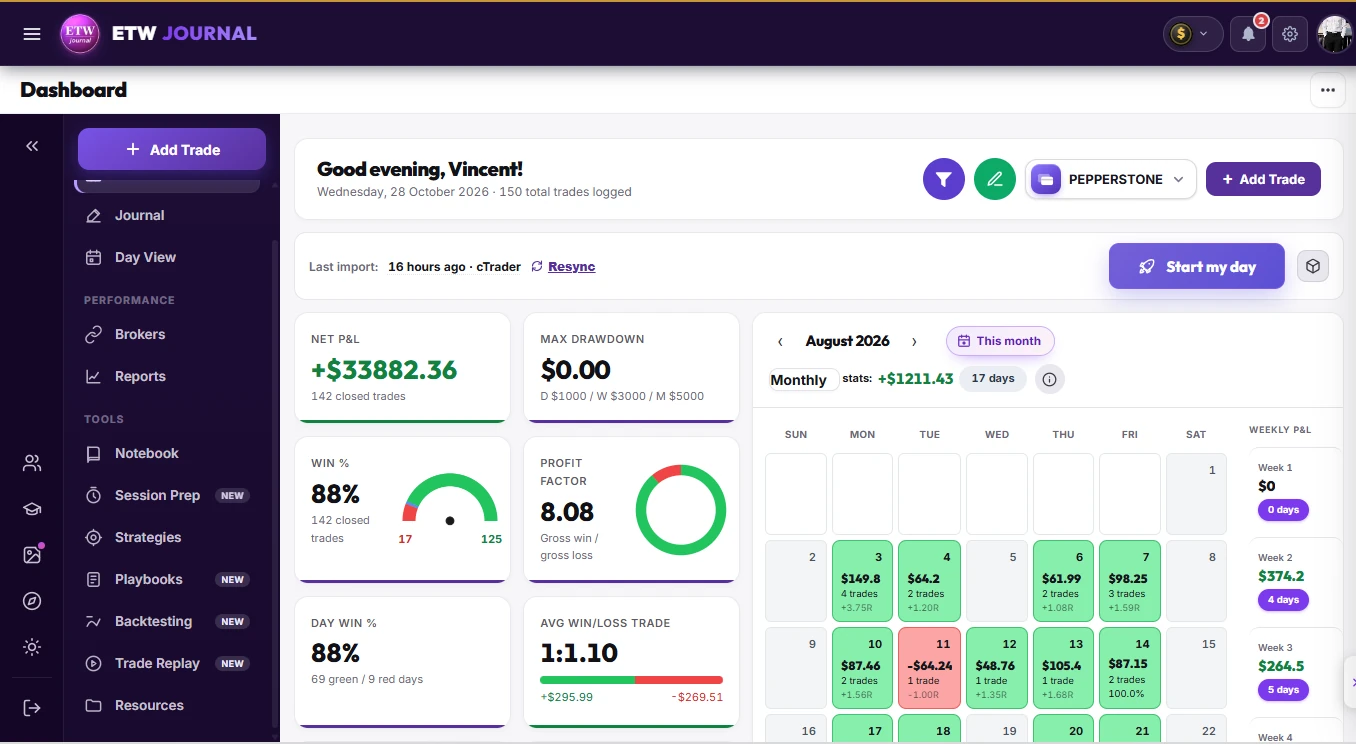
ETW Journal computes net P&L, win rate, profit factor, average win/loss, R:R, drawdown and streaks the moment trades land, then breaks them down by model and session. The P&L calendar shades every day green or red, so a bad week is obvious at a glance.
- Equity curve, day win % and best trade on one dashboard
- Weekly totals next to every calendar row
- Every account tracked separately — or all together
AI review
Notion AI writes. ETW AI reviews your trading.
Notion AI is a capable general assistant: it summarises pages, drafts text and searches your workspace. But it only knows what you've typed into Notion, and it has no idea what a profit factor is unless you built that data yourself.
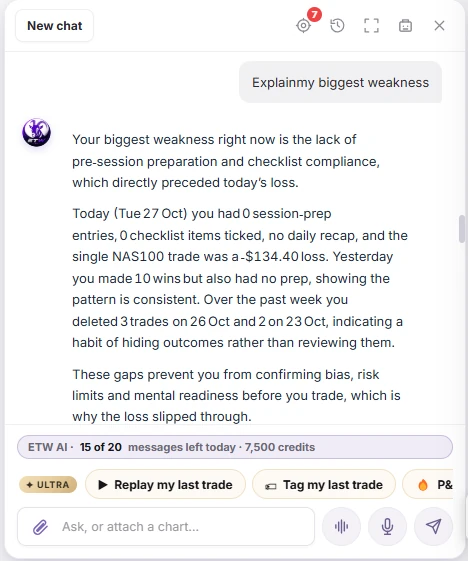
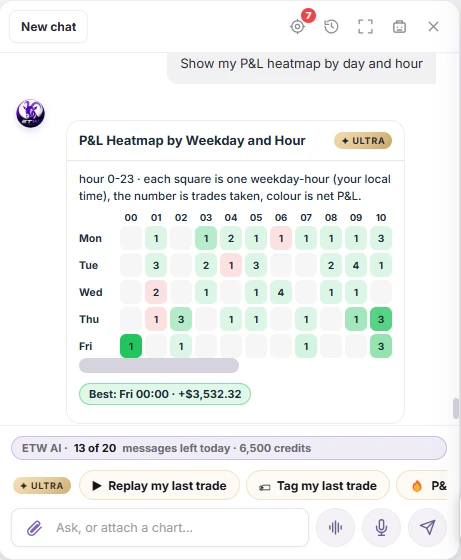
ETW AI works on your synced trades, notes and checklists. Ask “What is my biggest weakness right now?” and it answers from your own history — missed session prep, skipped checklist items, the weekdays that pay and the habits that don't. It can also chart your equity curve on request and draft a market briefing for your session.
Playbooks & rules
A checklist page vs. rules that are measured
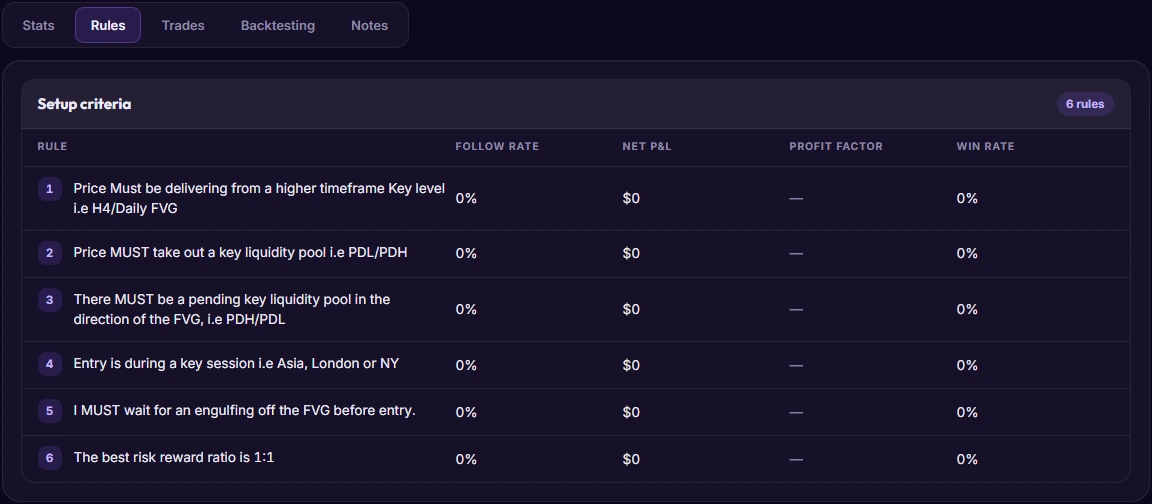
In Notion, a playbook is a page. You can write your rules beautifully — but Notion can't tell you whether the trades that followed rule 3 made more money than the ones that broke it.
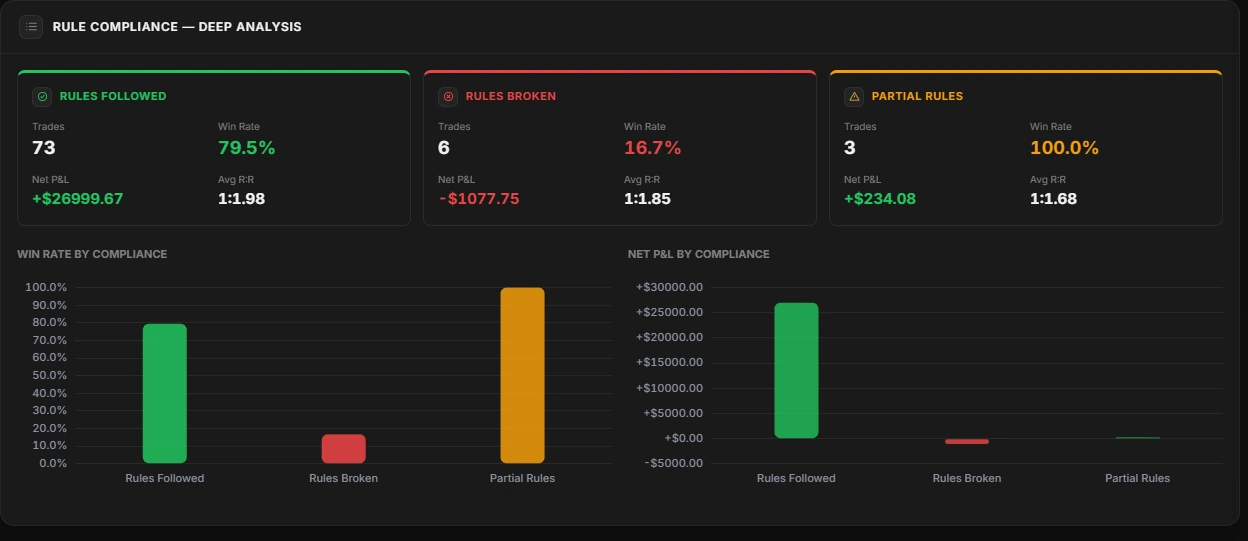
ETW Playbooks turn each setup into a checklist attached to your trades, then report the follow rate, net P&L, profit factor and win rate of every rule. The rule-compliance report puts followed, broken and partial trades side by side, so “stick to the plan” becomes a number.
Example from the report: trades that followed the rules won 79.5% of the time; trades that broke them won 16.7%. That's the kind of proof a Notion page can't produce on its own.
Beyond notes
What a document app simply can't do
Some parts of trade review need market data and a chart engine, which a workspace app doesn't have. In ETW Journal you can replay an executed trade bar by bar with your real entry, stop and target; replay a full day or build a what-if scenario; and practise setups in backtesting sessions with risk-based sizing.
Add a built-in economic calendar in your own time zone and Prop Firm Sync, which checks every synced trade against your firm's drawdown and daily-loss rules, and you have the parts of a trading routine that Notion templates usually link out to.
Explore every tool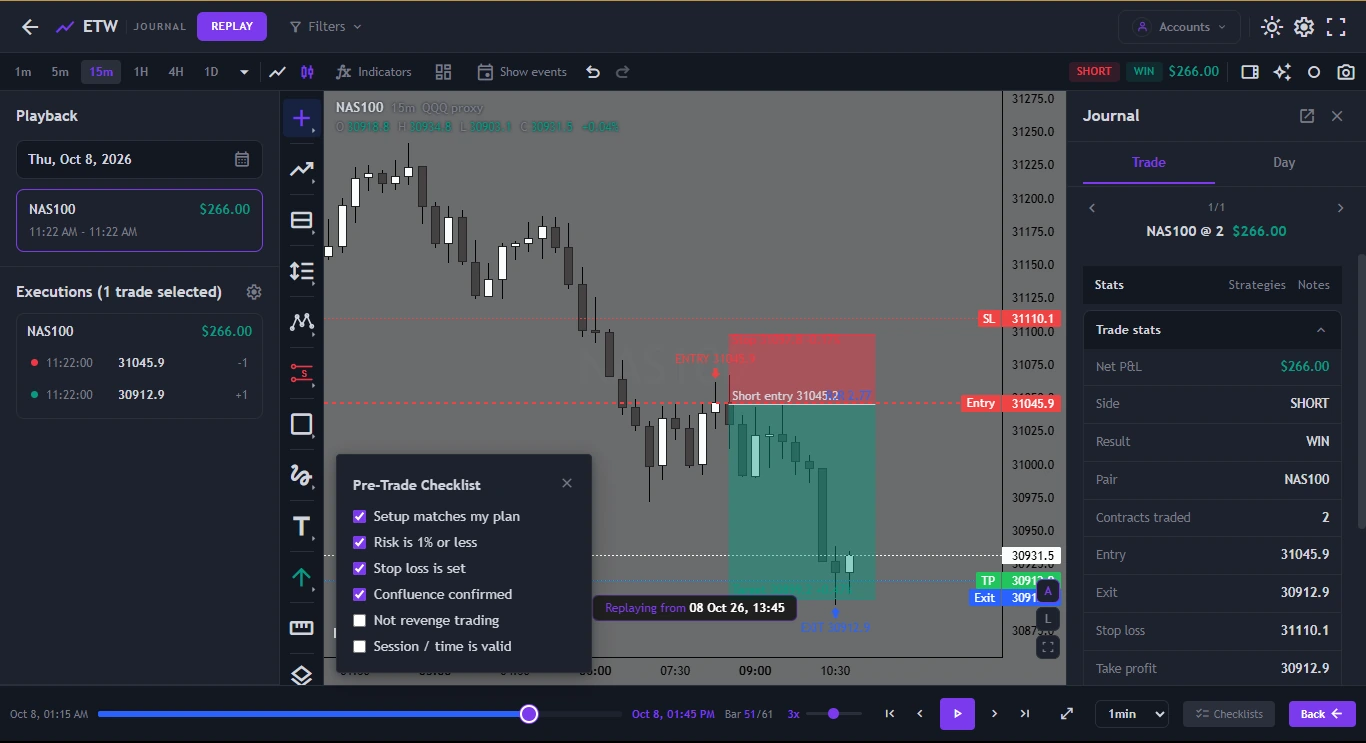
Pricing
How the pricing compares
Notion is cheaper on paper — it can be free. The real cost of a Notion journal is time: building the template, typing each trade and fixing formulas when something breaks.
ETW Journal
Monthly billing · yearly saves 17%
EssentialSync, journals, stats, reports, 3 backtesting sessions
$7/mo
Pro+ MT5/MT4 direct connect, ETW AI, trade replay, Mentor Mode, 10 backtests
$15/mo
Quarterly and yearly billing available. Cancel any time.
Notion
Per member · save up to 20% yearly
FreeUnlimited pages, 7-day page history, 5 MB uploads
$0
PlusLarger uploads, longer history; AI is a limited trial
$10/mo
BusinessIncludes Notion AI
$20/mo
Notion prices from notion.com/pricing. None of the plans include broker sync or trading analytics.
Fair is fair
Where Notion genuinely wins
Notion is excellent software. If these matter more to you than automation, it may be the right home for your journal.
It can cost nothing
The Free plan is generous for a single person. ETW Journal has no free plan, so if budget is the only factor, Notion wins.
Unlimited flexibility
Any field, any view, any layout. If you enjoy designing your own system, Notion lets you build exactly what you picture.
One workspace for everything
Trading notes can sit next to your goals, reading list, business docs and habit tracker — and link to all of them.
Long-form writing
For trade plans, weekly essays and psychology notes, Notion's editor is a pleasure to write in.
Final verdict
ETW Journal vs Notion: which should you choose?
If journaling is mostly writing — a few trades a week, long reflections, plans and goals in one place — Notion is a great, low-cost choice. Plenty of traders keep it for exactly that.
If you trade most days, run several accounts or are working through prop challenges, the bottleneck isn't where you write; it's getting accurate data in without effort and turning it into answers. That's what ETW Journal is built for: trades sync from MT5, MT4, cTrader, TradeLocker or DXtrade, the stats and reports build themselves, and ETW AI tells you what's costing you. Many traders use both — Notion for the big picture, ETW for the trades.
FAQ
ETW Journal vs Notion — Frequently Asked Questions
Is Notion good for a trading journal?
Yes, for low-frequency traders who mainly want to write. Notion's databases can hold trades and its formulas can calculate basic stats. The trade-off is that everything is manual: entering trades, building formulas and maintaining views.
Can Notion connect to MT5 or cTrader?
Not natively. Notion has no broker integrations, so trades are typed in or imported from CSV. Automation tools can push data through Notion's API, but you'd have to build and maintain that pipeline yourself.
Do I have to rebuild my old journal in ETW Journal?
No. When you connect MT5, MT4, cTrader or another supported platform, ETW Journal imports the full available history of that account, so past trades appear automatically. You can keep Notion for long-form notes if you like.
Does ETW Journal have a free plan?
No. Essential is $7 a month and Pro is $15 a month on monthly billing, and paying yearly saves 17%. You can cancel any time.
Is it safe to connect my trading account?
Yes. ETW Journal connects in read-only mode. It can see your trade history but can never place trades or move funds.
Can I use Notion and ETW Journal together?
Absolutely. A common setup is Notion for goals, plans and long reflections, and ETW Journal for the trades themselves — synced data, stats, replay and AI review.
Stop typing trades. Start reviewing them.
Connect MT5, MT4 or cTrader once — ETW Journal does the logging, the maths and the pattern-spotting.
Get started →
Keep comparing